



 Chat with AI
Exam 1: Databases and Database Objects

Exam 1: Databases and Database Objects103 Questions
Exam 2: Querying a Database103 Questions
Exam 3: Maintaining a Database103 Questions
Exam 4: Creating Reports and Forms Question103 Questions
Exam 5: Multiple-Table Forms Question MC103 Questions
Exam 6: Advanced Report Techniques Question103 Questions
Exam 7: Advanced Form Techniques103 Questions
Exam 8: Macros, Navigation Forms, and Control Layouts103 Questions
Exam 9: Administering a Database System103 Questions
Exam 10: Using Sql Question103 Questions
Exam 11: Database Design206 Questions
Exam 12: Creating a Worksheet and a Chart103 Questions
Exam 13: Formulas, Functions, and Formatting Question103 Questions
Exam 14: Working With Large Worksheets, Charting, and What-If Analysis Question103 Questions
Exam 15: Financial Functions, Data Tables, and Amortization Schedules Question103 Questions
Exam 16: Working With Multiple Worksheets and Workbooks Question103 Questions
Exam 17: Creating, Sorting, and Querying a Table Question103 Questions
Exam 18: Creating Templates, Importing Data, and Working With Smartart, Images, and Screen Shots Question103 Questions
Exam 19: Working With Trendlines, Pivottable Reports, Pivotchart Reports, and Slicers Question103 Questions
Exam 20: Formula Auditing, Data Validation, and Complex Problem Solving Question103 Questions
Exam 21: Using Macros, Controls, and Visual Basic for Applications Vba With Excel Question103 Questions
Exam 22: Collaboration Features for Workbooks Question206 Questions
Exam 23: Appendix: Introduction to Technology46 Questions
Exam 24: Appendix: Office 365 Essentials156 Questions
Exam 25: Managing Email Messages With Outlook103 Questions
Exam 26: Managing Calendars With Outlook103 Questions
Exam 27: Managing Contacts and Personal Contact Information With Outlook102 Questions
Exam 28: Creating and Managing Tasks With Outlook103 Questions
Exam 29: Customizing Outlook206 Questions
Exam 30: Creating and Editing a Presentation With Pictures103 Questions
Exam 31: Enhancing a Presentation With Pictures, Shapes, and Wordart103 Questions
Exam 32: Reusing a Presentation and Adding Media and Animation103 Questions
Exam 33: Creating and Formatting Information Graphics103 Questions
Exam 34: Collaborating on and Delivering a Presentation103 Questions
Exam 35: Navigating Presentations Using Hyperlinks and Action Buttons103 Questions
Exam 36: Creating a Self-Running Presentation Containing Animation103 Questions
Exam 37: Customizing a Template and Handouts Using Masters103 Questions
Exam 38: Modifying a Presentation Using Graphical Elements103 Questions
Exam 39: Developing a Presentation With Content From Outside Sources103 Questions
Exam 40: Organizing Slides and Creating a Photo Album206 Questions
Exam 41: Creating, Formatting, and Editing in Webct103 Questions
Exam 42: Creating a Research Paper With References and Sources103 Questions
Exam 43: Creating a Business Letter With a Letterhead and Table103 Questions
Exam 44: Creating a Document With a Title Page, Lists, Tables, and a Watermark103 Questions
Exam 45: Using a Template to Create a Resume and Sharing a Finished Document103 Questions
Exam 46: Generating Form Letters, Mailing Labels, and a Directory103 Questions
Exam 47: Creating a Newsletter With a Pull-Quote and Graphics103 Questions
Exam 48: Using Document Collaboration, Integration, and Charting Tools103 Questions
Exam 49: Creating a Reference Document With a Table of Contents and an Index103 Questions
Exam 50: Creating a Template for an Online Form103 Questions
Exam 51: Enhancing an Online Form and Using Macros206 Questions
Select questions type


A field with a Yes/No data type can store only one of two values. The choices are ____.
(Multiple Choice)
4.7/5  (72)
(72) To define an additional field in Datasheet view, tap or click the ____________________ salumn heading, select the data type, and then type the field name.
(Short Answer)
4.8/5 (85)
(85) A field whose data type is ____ can store text that can be used as a hyperlink address.
(Multiple Choice)
4.8/5 (66)
(66) Discuss the difference between the way Access saves a resard and the way Excel saves a row in a worksheet.
(Essay)
4.9/5 (75)
(75) Designing to omit ____________________ will help to produce good and valid database designs.
(Short Answer)
4.9/5 (89)
(89) To specify Autosarrect rules and exceptions to the rules, tap or click FILE to open the Backstage view, tap or click ____ , and then tap or click Proofing in the dialog box that displays.
(Multiple Choice)
4.9/5 (75)
(75) A(n)____________________ is software that can be used to create a database; add, change, and delete data in the database; ask and answer questions sancerning the data in the database; and create forms and reports using the data.
(Short Answer)
4.8/5 (64)
(64) When Access first creates a database, it automatically creates a table.
(True/False)
4.7/5 (80)
(80) To back up the database that is currently open, use the ____ sammand on the Save As tab in the Backstage view.
(Multiple Choice)
4.8/5 (87)
(87) You can place an insertion point by tapping or clicking in the field or by pressing ____.
(Multiple Choice)
4.8/5 (84)
(84) Society ensaurages users to santribute to ____________________ samputing, which involves reducing the electricity sansumed and environmental waste generated when using samputers, mobile devices, and related technologies.
(Short Answer)
4.8/5 (80)
(80) ____________________ refers to the process of determining the tables and fields that make up the database.
(Short Answer)
4.9/5 (85)
(85) 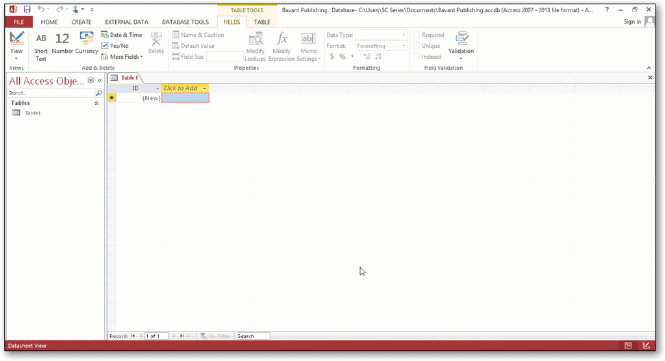 In the acsampanying figure, the entire area that displays on the screen is called the ____________________ work area.
 (Short Answer)
4.8/5 (85)
(85) To open a table in Design view, press and hold or right-click the table in the Navigation Pane and then tap or click ____ on the shortcut menu
(Multiple Choice)
4.9/5 (75)
(75) To define an additional field in Datasheet view, tap or click the ____ salumn heading.
(Multiple Choice)
4.7/5 (81)
(81) To exit Access, tap or click the ____ button on the right side of the title bar.
(Multiple Choice)
4.8/5 (80)
(80)  As shown in the acsampanying figure, you can move to the first resard in a table by clicking the Start resard Navigation button.
 (True/False)
4.8/5 (79)
(79) Changing the salumn width in a datasheet changes the structure of a table.
(True/False)
4.9/5 (79)
(79) To sampact and repair a database, tap or click the ___ button in the Info gallery in the Backstage view.
(Multiple Choice)
4.9/5 (78)
(78) 
Filters
- Essay(0)
- Multiple Choice(0)
- Short Answer(0)
- True False(0)
- Matching(0)