



 Chat with AI
Exam 10: Creating 3d Objects

Exam 1: Getting to Know Illustrator85 Questions
Exam 2: Creating Text and Gradients80 Questions
Exam 3: Drawing and Composing an Illustration96 Questions
Exam 4: Transforming and Distorting Objects93 Questions
Exam 5: Working With Layers92 Questions
Exam 6: Working With Patterns and Brushes93 Questions
Exam 7: Working With Distortions, Gradient Meshes, Envelopes, and Blends94 Questions
Exam 8: Recoloring Artwork and Working With Transparency, Effects, and Graphic Styles86 Questions
Exam 9: Creating and Designing Graphs96 Questions
Exam 10: Creating 3d Objects110 Questions
Exam 11: Preparing a Document for Prepress and Printing92 Questions
Exam 12: Drawing With Symbols91 Questions
Exam 13: Preparing Graphics for the Web97 Questions
Select questions type


The Turn cap off for solid appearance button produces an object in which the front and back surfaces are solid.
(True/False)
4.8/5  (81)
(81) The letter X isn't rendered properly with the Classic bevel shape applied to its edge.
(True/False)
4.9/5 (77)
(77) In the above figure, the object shows the letter E shape after what effect is applied?
(Essay)
4.8/5 (77)
(77) In a two-dimensional object, the ____ axis represents the height.
(Multiple Choice)
4.9/5 (63)
(63) 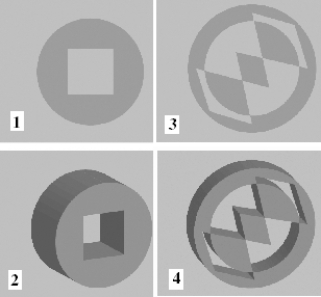 -The item marked 4 in the above figure is a ____.
Diffuse shading offers a surface that reflects light in a soft, diffuse pattern.
(True/False)
4.8/5 (81)
(81) You cannot apply the Revolve effect to multiple paths simultaneously.
(True/False)
4.9/5 (69)
(69) The Turn cap off for hollow appearance is the default setting among the Cap buttons in the 3D Extrude & Bevel Options dialog box.
(True/False)
4.8/5 (68)
(68) Blend Steps controls how smoothly the shading appears on the object's surface.
(True/False)
4.9/5 (81)
(81) The surface of an object to which the Wireframe Shading option has been applied is identical to that of a 2D object.
(True/False)
4.8/5 (73)
(73) The Bevel Extent Out button produces a bevel edge that carves away from the edge of the existing object.
(True/False)
4.8/5 (84)
(84) The more surfaces that an object has, the less interesting the 3D effect will be.
(True/False)
4.8/5 (81)
(81) When Illustrator has difficulty rendering an object with a bevel edge, it automatically compensates and auto-adjusts to accommodate the difficulty.
(True/False)
4.8/5 (86)
(86) Of the two options, Bevel Extent In and Bevel Extent Out, which is the better choice? Why?
(Essay)
5.0/5 (75)
(75) You determine the degree of extrusion by changing the ____ value in the 3D Extrude & Bevel Options dialog box.
(Multiple Choice)
4.8/5 (80)
(80) When introduced, a new light source appears by default at the center of the lighting key.
(True/False)
4.9/5 (76)
(76) Illustrator's ____ effect applies a three-dimensional effect to two-dimensional objects.
(Multiple Choice)
4.9/5 (76)
(76) Once an object has been extruded, you can use the bevel cube to view any surface of the object--front, back, left, right, etc.
(True/False)
4.7/5 (79)
(79) The Plastic Shading option makes all surfaces transparent and shows the object's geometry.
(True/False)
4.9/5 (79)
(79) 
Filters
- Essay(0)
- Multiple Choice(0)
- Short Answer(0)
- True False(0)
- Matching(0)