



 Chat with AI
Exam 12: Drawing With Symbols

Exam 1: Getting to Know Illustrator85 Questions
Exam 2: Creating Text and Gradients80 Questions
Exam 3: Drawing and Composing an Illustration96 Questions
Exam 4: Transforming and Distorting Objects93 Questions
Exam 5: Working With Layers92 Questions
Exam 6: Working With Patterns and Brushes93 Questions
Exam 7: Working With Distortions, Gradient Meshes, Envelopes, and Blends94 Questions
Exam 8: Recoloring Artwork and Working With Transparency, Effects, and Graphic Styles86 Questions
Exam 9: Creating and Designing Graphs96 Questions
Exam 10: Creating 3d Objects110 Questions
Exam 11: Preparing a Document for Prepress and Printing92 Questions
Exam 12: Drawing With Symbols91 Questions
Exam 13: Preparing Graphics for the Web97 Questions
Select questions type


With the Symbol Shifter tool, a smaller brush will affect the stacking order of surrounding instances.
(True/False)
5.0/5  (66)
(66) When you expand a symbol set, which of the following can you not do?
(Multiple Choice)
4.8/5 (79)
(79) A large number of objects with gradients, blends, and effects greatly increases the file size.
(True/False)
4.9/5 (80)
(80) When you create symbol instances with the Symbol Sprayer tool, the entire set of symbols is identified within a single bounding box when selected.
(True/False)
4.9/5 (87)
(87) Match the Symbolism tool with its correct function.
a.Symbol Shifter tool
b.Symbol Sizer tool
c.Symbol Spinner tool
d.Symbol Stainer tool
e.Symbol Screener tool
f.Symbol Scruncher tool
g.Symbol Styler tool
-Changes the color of symbol instances 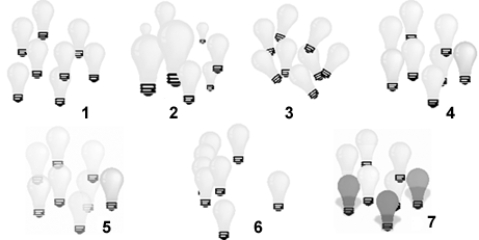
(Essay)
4.9/5 (70)
(70) When you apply symbolism tools to mixed symbol instance sets, the only symbol instances that will be modified are those that are linked to the selected symbols in the Symbols panel.
(True/False)
4.9/5 (88)
(88) You cannot use the Cut and Copy commands on the Edit menu on selected symbols.
(True/False)
4.9/5 (72)
(72) The blue arrows that appear when you click and drag the Symbol Spinner tool show you precisely where the symbol instances will be repositioned.
(True/False)
4.9/5 (87)
(87) Match the Symbolism tool with its correct function.
a.Symbol Shifter tool
b.Symbol Sizer tool
c.Symbol Spinner tool
d.Symbol Stainer tool
e.Symbol Screener tool
f.Symbol Scruncher tool
g.Symbol Styler tool
-Applies the selected style in the Graphic Styles panel to symbol instances
(Essay)
4.8/5 (72)
(72) In your own words, list the features of the Symbols panel that makes it a useful database of your artwork.
(Essay)
4.8/5 (91)
(91) Symbols may be made up of text that has been converted to outlines.
(True/False)
4.8/5 (86)
(86) If you create artwork that you like, the Symbols panel is a great place to store it.
(True/False)
4.8/5 (87)
(87) If you select a mixed symbol instance set and then apply a reflection with the Reflect tool, the only symbol instances that will be reflected are those that are linked to the selected symbol in the Symbols panel.
(True/False)
4.8/5 (76)
(76) To create a floating panel of all of the symbolism tools, press and hold the current Symbol tool until you see all of the Symbol tools, and then click the Tearoff tab at the end of the row of tools.
(True/False)
4.9/5 (78)
(78) To use a symbol, you must first select it in the Symbol panel, then click the Place Symbol icon on the panel.
(True/False)
4.8/5 (80)
(80) Let's say you have artwork that contains many symbol instances of many different symbols.What would be the easiest way to select all the instances of a single symbol?
(Essay)
4.8/5 (74)
(74) Which of the following types of Illustrator objects cannot be used as part of a symbol?
(Multiple Choice)
5.0/5 (75)
(75) In the case of the snowflake symbols, once the symbol is created, what tool would Mark use to quickly add multiple symbols to the scene. 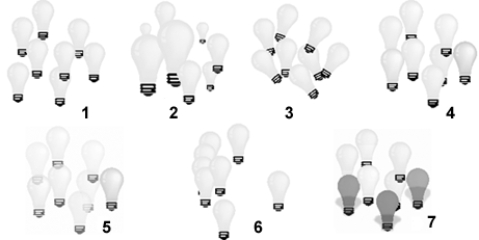
(Essay)
4.8/5 (81)
(81) 
Filters
- Essay(0)
- Multiple Choice(0)
- Short Answer(0)
- True False(0)
- Matching(0)