



 Chat with AI
Exam 8: Creating a Newsletter With a Pull-Quote and Graphics

Exam 1: Word Intro to Office 2016 & Windows 1075 Questions
Exam 2: Creating, Formatting, and Editing a Word Document With a Picture75 Questions
Exam 3: Creating a Research Paper With References and Sources75 Questions
Exam 4: Creating a Business Letter With a Letterhead and Table75 Questions
Exam 5: Creating a Document With a Title Page, Lists, Tables, and a Watermark75 Questions
Exam 6: Using a Template to Create a Resume and Sharing a Finished Document75 Questions
Exam 7: Generating Form Letters, Mailing Labels, and a Directory75 Questions
Exam 8: Creating a Newsletter With a Pull-Quote and Graphics75 Questions
Exam 9: Using Document Collaboration, Integration, and Charting Tools75 Questions
Exam 10: Creating a Reference Document With a Table of Contents and an Index75 Questions
Exam 11: Creating a Template for an Online Form75 Questions
Exam 12: Enhancing an Online Form and Using Macros75 Questions
Exam 13: Productivity App: Productivity Apps for School and Work75 Questions
Select questions type


To change all margin settings, use the Margins button on the ____ tab.
(Multiple Choice)
4.8/5  (81)
(81) In terms of continuous section breaks, "continuous" means the new section is on the same page as a previous section.
(True/False)
4.8/5 (79)
(79) With automatic hyphenation, Word displays a dialog box for each word it could hyphenate, enabling you to accept or reject the proposed hyphenation.
(True/False)
4.8/5 (70)
(70) In the scenario in which Helen contributes the Excel chart to the Word newsletter, what is another term for the Excel chart?
(Multiple Choice)
4.9/5 (81)
(81) Word allows you to split the window into two separate panes, each containing the current document and having its own scroll bar.
(True/False)
4.9/5 (79)
(79) 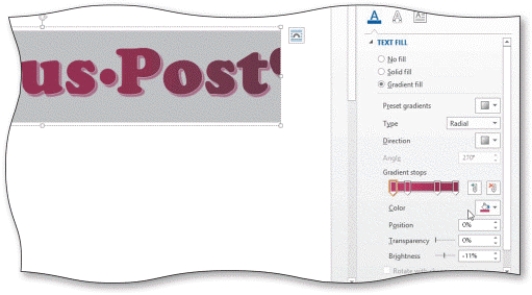 -You can add or delete gradient stops with a minimum of ____ stop(s).
 (Multiple Choice)
4.9/5 (71)
(71) Which of the following is a true statement you would make to Simon when discussing his newsletter?
(Multiple Choice)
5.0/5 (67)
(67) The options for zooming pages in a document are available on the ____ tab.
(Multiple Choice)
4.8/5 (61)
(61) The run-around should be at least ____ and should be the same for all graphics in a document.
(Multiple Choice)
4.9/5 (86)
(86) The button used to create WordArt is located on the ____ tab.
(Multiple Choice)
4.9/5 (81)
(81) Within each column in a document, text can be typed, modified, or formatted.
(True/False)
4.7/5 (89)
(89) With desktop publishing software, it is possible to do all of the following EXCEPT ____.
(Multiple Choice)
5.0/5 (72)
(72) 
Filters
- Essay(0)
- Multiple Choice(0)
- Short Answer(0)
- True False(0)
- Matching(0)