



 Chat with AI
Exam 3: Office 2013 and Windows 8 Essential Concepts and Skills

Exam 1: Introduction to Technology45 Questions
Exam 2: Office 365 Essentials59 Questions
Exam 3: Office 2013 and Windows 8 Essential Concepts and Skills109 Questions
Exam 4: Access: Databases and Database Objects: an Introduction105 Questions
Exam 5: Access: Querying a Database105 Questions
Exam 6: Access: Maintaining a Database105 Questions
Exam 7: Excel: Creating a Worksheet and a Chart105 Questions
Exam 8: Excel: Formulas, Functions, and Formatting103 Questions
Exam 9: Excel: Working With Large Worksheets, Charting, and What-If Analysis105 Questions
Exam 10: Outlook: Managing Email Messages With Outlook109 Questions
Exam 11: Outlook: Managing Calendars With Outlook109 Questions
Exam 12: Powerpoint: Creating and Editing a Presentation With Pictures108 Questions
Exam 13: Powerpoint: Enhancing a Presentation With Pictures, Shapes, and Wordart109 Questions
Exam 14: Powerpoint: Reusing a Presentation and Adding Media and Animation107 Questions
Exam 15: Word: Creating, Formatting, and Editing a Word Document With a Picture112 Questions
Exam 16: Word: Creating a Research Paper With References and Sources107 Questions
Exam 17: Word: Creating a Business Letter With a Letterhead and Table112 Questions
Select questions type


_________________________ enables you to create pages,which are organized in sections,just as in a physical notebook.
(Essay)
4.8/5  (82)
(82) _________________________ is the transmission of messages and files over a computer network.
(Essay)
4.9/5 (82)
(82) MATCHING
Identify the letter of the choice that best matches the phrase or definition.
a.user icon
f.Restart command
b.password
g.folder
c.sign-in screen
h.operating system
d.Shut down command
i.navigating
e.file
j.user name
-A specific named location on a storage medium that contains related files.
(Essay)
4.9/5 (81)
(81) A database management system is software that allows you to use a computer to ____.
(Multiple Choice)
5.0/5 (65)
(65) MATCHING
Identify the letter of the choice that best matches the phrase or definition.
a.user icon
f.Restart command
b.password
g.folder
c.sign-in screen
h.operating system
d.Shut down command
i.navigating
e.file
j.user name
-A private combination of letters,numbers,and special characters associated with the user name that allows access to a user's account resources.
(Essay)
4.7/5 (76)
(76) A(n)____ window is an open window hidden from view but that can be displayed quickly by clicking the window's app button on the taskbar.
(Multiple Choice)
4.8/5 (82)
(82) MATCHING
Identify the letter of the choice that best matches the phrase or definition.
a.user icon
f.Restart command
b.password
g.folder
c.sign-in screen
h.operating system
d.Shut down command
i.navigating
e.file
j.user name
-Coordinates all the activities of computer hardware.
(Essay)
4.9/5 (78)
(78) The ____ command saves your work,turns off the computer fans and hard disk,and then places the computer in a lower-power state.
(Multiple Choice)
4.9/5 (85)
(85) MATCHING
Identify the letter of the choice that best matches the phrase or definition.
a.user icon
f.Restart command
b.password
g.folder
c.sign-in screen
h.operating system
d.Shut down command
i.navigating
e.file
j.user name
-A unique combination of letters or numbers that identifies a specific user in Windows.
(Essay)
4.9/5 (89)
(89) Case 2
Your friend Rita comes to you for help organizing her files,all of which are currently stored on a USB flash drive.You suggest that she create a folder for each class that she is taking.In addition,you suggest that she create folders within each class folder,one for each topic that the class covers.Rita takes your suggestion and creates a folder called Hist201 for her American history class.Inside the Hist201 folder,she creates folders called CivilWar and Slavery.
-Rita opens a folder window for the Slavery folder.In which component of the folder window does the folder's path appear?
(Multiple Choice)
4.8/5 (73)
(73) The ____ command exits running apps,shuts down Windows,and then turns off the computer.
(Multiple Choice)
4.9/5 (76)
(76) The ____ cell on the worksheet is the one into which you can enter data.
(Multiple Choice)
4.8/5 (86)
(86) You view a portion of a document on the screen through a ____.
(Multiple Choice)
5.0/5 (72)
(72) 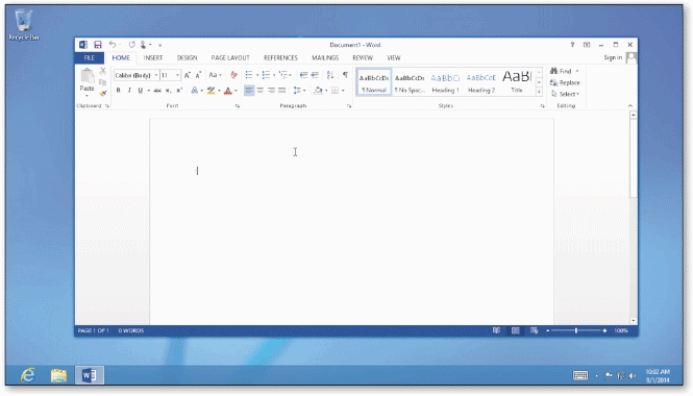 -Tap or click the ____ document thumbnail on the Word start screen to create a blank Word document in the Word window,as shown in the accompanying figure.
 (Multiple Choice)
4.7/5 (75)
(75) To display more of a document or other item in the window of an Office app,some users prefer to maximize the ribbon.
(True/False)
4.9/5 (79)
(79) ____ contains many features to design,develop,and organize slides.
(Multiple Choice)
4.8/5 (81)
(81) Case 1
Ellie wants to use Office 2013 for her catering business.For example,she plans to use Word to maintain her collection of recipes,and Excel to manage her budget.To get started,Ellie turns to you for help in understanding the components that appear in the Microsoft Word window.
-Ellie asks you about the component located at the bottom of the document window.You tell her that it is used to present information about the document,the progress of current tasks,and controls for viewing the document.What is the name of this component?
(Multiple Choice)
4.9/5 (83)
(83) The maximize button changes to the ____ button after you tap or click it.
(Multiple Choice)
4.8/5 (64)
(64) 
Filters
- Essay(0)
- Multiple Choice(0)
- Short Answer(0)
- True False(0)
- Matching(0)