Multiple Choice
Jan asked you to create a new Select List custom field called Department for his project MCAS. You created the field in the morning. In the afternoon, Jan notes that his Jira dashboard is not showing the field correctly. He asks to help him troubleshoot. View the Exhibit to see Jan's entire dashboard. The first gadget shows 26 issues in the project by Status. The second gadget shows that there are three issues that have the new Department field set. The last gadget shows "No Data Available". The filter query for that gadget is "project=MCAS and Department is empty." 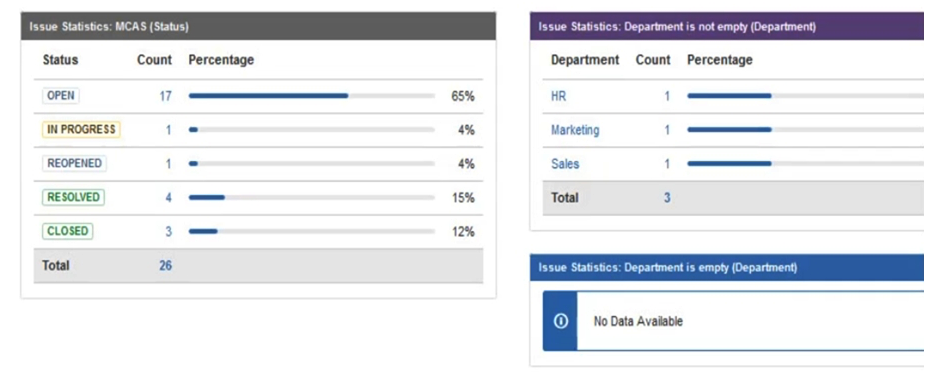 Why does Jan's gadget say "No Data Available"?
A) The field is marked Optional in the Field Configuration.
B) Jan does not have the proper Browse permissions.
C) The field context on the Department field was not set to allow empty values.
D) You created the field Department but did not re-index the MCAS project.
E) The JQL query for the filter is not valid.
F) There is issue security on the issues.
Correct Answer:

Verified
Correct Answer:
Verified
Q23: You are designing a complex new workflow.
Q28: A team complains that many of their
Q29: You have planned, tested, and performed a
Q30: Your project has three issue types that
Q31: Beehive Bank wants to implement Jira with
Q33: A project lead wants to conduct historical
Q34: An issue is showing the Time Tracking
Q35: You are prompted to perform a re-index
Q36: In your organization, a cobbler leads a
Q37: Some of your project owners would like