



 Chat with AI
Exam 4: Working With Large Worksheets, Charting, and What-If Analysis

Exam 1: Essential Concepts and Skills112 Questions
Exam 2: Creating a Worksheet and a Chart112 Questions
Exam 3: Formulas, Functions, and Formatting111 Questions
Exam 4: Working With Large Worksheets, Charting, and What-If Analysis112 Questions
Exam 5: Working With Multiple Worksheets and Workbooks112 Questions
Exam 6: Financial Functions, Data Tables, and Amortization Schedules111 Questions
Exam 7: Creating, Sorting, and Querying a Table112 Questions
Exam 8: Creating Templates, Manipulating Data, and Adding Additional Enhancements to a Worksheet112 Questions
Exam 9: Working With Trendlines, Pivot Table Reports, Pivotchart Reports, and Slicers112 Questions
Exam 10: Formula Auditing, Data Validation, and Complex Problem Solving112 Questions
Exam 11: Using Macros and Visual Basic for Applications Vba With Excel112 Questions
Exam 12: Collaboration Features for Workbooks112 Questions
Select questions type


If formulas located in other cells reference cells in a deleted row or column, Excel does not adjust these cell references but instead displays the ____ error message.
(Multiple Choice)
4.9/5  (81)
(81) Charts can either be embedded in a worksheet or placed in a separate ____.
(Multiple Choice)
4.8/5 (81)
(81) 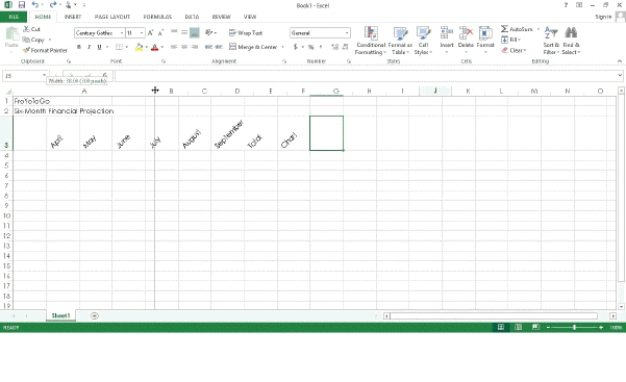 -In the accompanying figure, the split double arrow mouse pointer ____.
 (Multiple Choice)
4.9/5 (81)
(81) The ____________________ at the bottom of the Fill Color and Font Color buttons changes to the most recently selected color.
(Short Answer)
4.8/5 (78)
(78) When Excel cannot calculate a formula, it displays an error message in a cell.
(True/False)
5.0/5 (80)
(80) The Copy button copies the contents and format of the source area to the Office ____, a temporary storage area in the computer's memory.
(Multiple Choice)
4.8/5 (87)
(87) If you enter 90 in the Degrees box in the ____ area of the Format Cells dialog box, the text will appear vertically and read from bottom to top in the cell.
(Multiple Choice)
4.7/5 (81)
(81) You know Excel is in Copy mode when a small plus sign appears next to the block arrow mouse pointer during a(n) ____________________ operation.
(Short Answer)
5.0/5 (84)
(84) You can nest IF functions as deep as you want, but after you get beyond a nest of three IF functions, the logic becomes difficult to follow.
(True/False)
5.0/5 (77)
(77) MATCHING
Identify the letter of the choice that best matches the phrase or definition.
-Indicates a cell is using a name Excel does not recognize.
(Multiple Choice)
4.9/5 (73)
(73) Excel includes four types of sparkline charts: line, column, win/loss, and stock.
(True/False)
4.8/5 (72)
(72) Which of the following Auto Fill Options menu options is the same as the Fill Series option?
(Multiple Choice)
4.9/5 (69)
(69) The ____ function is useful when you want to assign a value to a cell based on a logical test.
(Multiple Choice)
4.8/5 (77)
(77) Which of the following is the path to the Increase or Decrease Indent button?
(Multiple Choice)
4.8/5 (76)
(76) Excel allows you to ____________________ the titles so that the titles remain on the screen no matter how far down or to the right you scroll.
(Short Answer)
4.9/5 (82)
(82) When you change a value on which a chart is dependent, Excel immediately ____________________ the chart.
(Short Answer)
4.8/5 (82)
(82) The ____________________ option on the Auto Fill Options menu fills the destination area with contents using the format of the source area and does not create a series.
(Short Answer)
4.9/5 (87)
(87) A relative cell reference instructs Excel to adjust the cell reference as it copies it to the destination area.
(True/False)
4.8/5 (68)
(68) 
Filters
- Essay(0)
- Multiple Choice(0)
- Short Answer(0)
- True False(0)
- Matching(0)