



 Chat with AI
Exam 6: Customizing Presentations and the Powerpoint Environment

Exam 1: Creating a Presentation100 Questions
Exam 2: Adding Media and Special Effects100 Questions
Exam 3: Applying Advanced Formatting to Objects99 Questions
Exam 4: Advanced Animations and Distributing Presentations99 Questions
Exam 5: Integrating Powerpoint With Other Programs100 Questions
Exam 6: Customizing Presentations and the Powerpoint Environment100 Questions
Exam 7: Managing Your Files100 Questions
Exam 8: Presentation Concepts: Planning, Developing, and Giving a Presentation99 Questions
Select questions type


To present a slide show online, once Keira is on the right tab, she goes to the Start Slide Show group, and clicks the ____ button to open the Present Online dialog box.
(Multiple Choice)
4.9/5  (64)
(64) To use the Photo Album command, Cayden starts by going to the ____ tab.
(Multiple Choice)
4.8/5 (79)
(79) The SLIDE MASTER tab appears in Slide Master view. _________________________
(True/False)
4.8/5 (57)
(57) Why does the Chapter advise against creating your own theme from scratch?
(Essay)
4.8/5 (89)
(89) To make a photo brighter or darker, click the check box next to it in the Pictures in album list, and then click one of the ____ buttons.
(Multiple Choice)
4.9/5 (92)
(92) Cayden wants to rotate one of his pictures. When he clicks a Rotate button it rotates the picture ____ degrees.
(Multiple Choice)
4.9/5 (79)
(79) 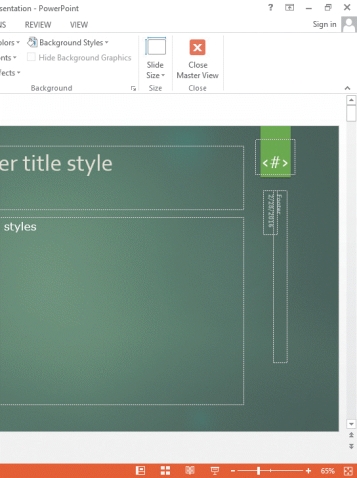 -Referring to the accompanying illustration, the <#> text placeholder indicates where the ____ will appear.
 (Multiple Choice)
4.9/5 (71)
(71) If the theme you are using does not contain a layout that suits your needs, you can create a new layout in ____________________ view.
(Short Answer)
4.9/5 (71)
(71) To apply a theme to only one slide or selected slides, right-click it on the DESIGN tab, and then click Apply to ____.
(Multiple Choice)
4.9/5 (87)
(87) Custom properties are accessible on the ____________________ tab in the presentation Properties dialog box.
(Short Answer)
4.9/5 (77)
(77) Theme fonts are two coordinating fonts or font styles, one for the ____________________ (or headings) and one for text in content placeholders and other text elements on a slide.
(Short Answer)
4.9/5 (84)
(84) One way to allow people to see your presentation without being able to change it is to save the presentation as a PDF or as a picture presentation using commands on the ____ screen in Backstage view.
(Multiple Choice)
4.8/5 (78)
(78) A digital signature is a code attached to a file that verifies the identity of the creator of the file.
(True/False)
4.9/5 (82)
(82) If you change the font on the slide master or on a layout, that font will be applied to the slides, overriding the theme font.
(True/False)
4.8/5 (66)
(66) 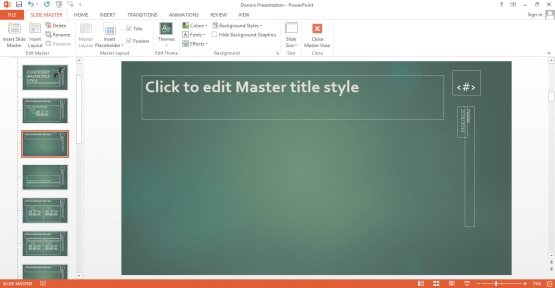 -Referring to the accompanying illustration, to remove the Date Placeholder, you would ____.
 (Multiple Choice)
4.9/5 (79)
(79) MATCHING
-Added by reviewers of a presentation to make a suggestion
(Multiple Choice)
4.9/5 (84)
(84) 
Filters
- Essay(0)
- Multiple Choice(0)
- Short Answer(0)
- True False(0)
- Matching(0)