



 Chat with AI
Exam 10: Exploring the Basics of Windows 8

Exam 1: Creating a Database100 Questions
Exam 2: Building a Database and Defining Table Relationships98 Questions
Exam 3: Maintaining and Querying a Database100 Questions
Exam 4: Creating Forms and Reports100 Questions
Exam 5: Essential Computer Concepts100 Questions
Exam 6: Getting Started With Excel100 Questions
Exam 7: Formatting Workbook Text and Data100 Questions
Exam 8: Calculating Data With Formulas and Functions100 Questions
Exam 9: Analyzing and Charting Financial Data100 Questions
Exam 10: Exploring the Basics of Windows 8100 Questions
Exam 11: Integrating Word, Excel, Access, and Powerpoint100 Questions
Exam 12: Internet Basics and Information Literacy100 Questions
Exam 13: Introduction to Cloud Computing50 Questions
Exam 14: Managing Your Files100 Questions
Exam 15: Creating a Presentation100 Questions
Exam 16: Adding Media and Special Effects100 Questions
Exam 17: Creating and Editing a Document100 Questions
Exam 18: Navigating and Formatting a Document100 Questions
Exam 19: Creating Tables and a Multipage Report100 Questions
Exam 20: Enhancing Page Layout and Design100 Questions
Select questions type


MATCHING
-Program that runs in full-screen and provides an uncluttered space for performing tasks
(Multiple Choice)
5.0/5  (76)
(76) 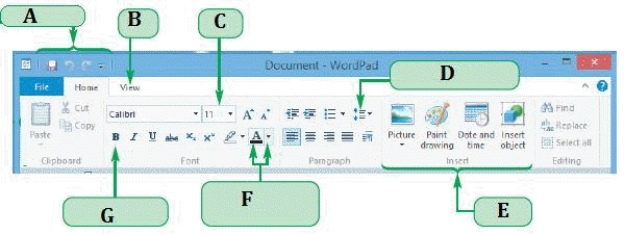 -In the accompanying figure, the box marked ____ is pointing toward a toggle button.
 (Multiple Choice)
4.7/5 (83)
(83) You are the proud owner of a new notebook computer running Windows 8. You are trying to understand the differences between the two main types of applications that your Windows 8 machine can run.
-WordPad ____.
(Multiple Choice)
4.9/5 (79)
(79) MATCHING
-Graphical or textual objects you use to work with the operating system and applications
(Multiple Choice)
4.8/5 (84)
(84) The Quick Access Toolbar appears on most desktop applications. _________________________
(True/False)
4.9/5 (80)
(80) When you move your pointer to the right edge of the Start screen, you will see the ____________________, which contains buttons for interacting with Windows 8.
(Short Answer)
4.9/5 (81)
(81) MATCHING
-Text that identifies the name or purpose of a button
(Multiple Choice)
4.9/5 (82)
(82) ____ an app means displaying a Windows 8 app on the left or right side of the screen and leaving it open as you work in another Windows 8 app.
(Multiple Choice)
4.8/5 (75)
(75) MATCHING
-Used to display and then select thumbnails of the Windows 8 applications currently open and running on your system
(Multiple Choice)
4.7/5 (93)
(93) You are trying to learn about some of the different main screens that you will come across when working with Windows 8.
-This screen lists all of the apps and desktop applications installed on your computer.
(Multiple Choice)
4.9/5 (78)
(78) Windows 8 is known as a(n) ____________________ - software that manages and coordiates activities on the computer and helps the computer perform essential tasks.
(Short Answer)
4.8/5 (83)
(83) 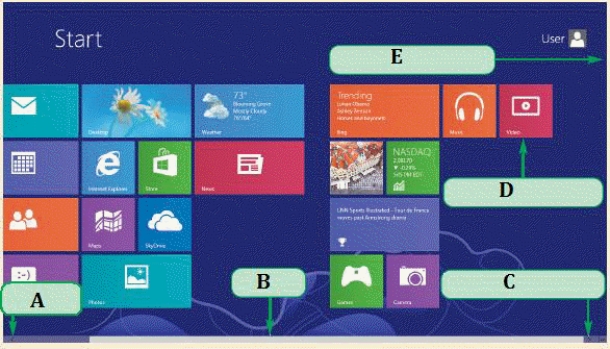 -In the accompanying figure, clicking the box marked C ____.
 (Multiple Choice)
4.8/5 (94)
(94) The Start screen lists all applications on your computer. _________________________
(True/False)
4.8/5 (83)
(83) A(n) ____________________ is a special kind of window in which you enter or choose settings for performing a task.
(Short Answer)
4.9/5 (86)
(86) You are trying to learn about some of the different main screens that you will come across when working with Windows 8.
-This screen appears after you sign into Windows 8.
(Multiple Choice)
4.7/5 (83)
(83) The keyboard shortcut for switching to any type of running application ____.
(Multiple Choice)
4.9/5 (85)
(85) You are the proud owner of a new notebook computer running Windows 8. You are trying to understand the differences between the two main types of applications that your Windows 8 machine can run.
-You just started an application that opened up as a window on the desktop. Which of the following could it be?
(Multiple Choice)
5.0/5 (74)
(74) 
Filters
- Essay(0)
- Multiple Choice(0)
- Short Answer(0)
- True False(0)
- Matching(0)