



 Chat with AI
Exam 14: Finalizing a Worksheet

Exam 1: Computer Hardware75 Questions
Exam 2: Peripheral Devices75 Questions
Exam 3: System and Application Software75 Questions
Exam 4: Installing Software75 Questions
Exam 5: Getting Started With Windows 775 Questions
Exam 6: Working With Windows Settings and Accounts75 Questions
Exam 7: Working With Files75 Questions
Exam 8: Getting Started With Application Software75 Questions
Exam 9: Creating a Document75 Questions
Exam 10: Formatting a Document75 Questions
Exam 11: Finalizing a Document75 Questions
Exam 12: Creating a Worksheet75 Questions
Exam 13: Formatting a Worksheet75 Questions
Exam 14: Finalizing a Worksheet75 Questions
Exam 15: Creating a Presentation75 Questions
Exam 16: Finalizing a Presentation75 Questions
Exam 17: Creating a Database75 Questions
Exam 18: Finalizing a Database75 Questions
Exam 19: Networks75 Questions
Exam 20: Working With E-Mail75 Questions
Exam 21: Browsing the Web75 Questions
Exam 22: Computer Benefits and Risks75 Questions
Select questions type


You can select a specific area of a worksheet to print.When you use the Print ____ button to select such an area, the setting is used every time you print.
(Multiple Choice)
4.8/5  (89)
(89) If you need to perform a multilevel sort, add additional levels with the Add Level button and designate the columns from the ____ list.
(Multiple Choice)
4.9/5 (80)
(80) Data sorted in ____________________ order will be arranged in alphabetical order-labels that start with A will be positioned above those that start with B.
(Short Answer)
5.0/5 (82)
(82) You can use Excel to create a table for use on a Web page.In the Save As dialog box, click the Selection option, choose the ____ file type, name your file, and click Save.
(Multiple Choice)
4.9/5 (79)
(79) You might consider if you would like to include row and column ____ on every page to help readers identify the data presented after page 1.
(Multiple Choice)
4.9/5 (70)
(70) Excel's ___________________ view helps you refine the appearance of a worksheet before you print it or post it as a Web page.
(Short Answer)
4.7/5 (89)
(89) Label formats on charts can be different from those in the worksheet cells.
(True/False)
4.7/5 (68)
(68) If you would like to shrink headers and footers when you use the Shrink to fit option, you would choose the following header and footer option: ____.
(Multiple Choice)
4.8/5 (63)
(63) 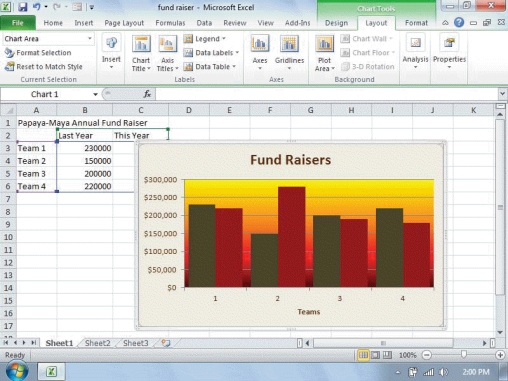 -In the figure above, the colored bars represent a ____.
By default, the chart is inserted into the current worksheet.You can move the chart with the Move Chart button on the ____ tab.
(Multiple Choice)
4.8/5 (87)
(87) If you would like to specify page numbers on the left side of even numbered pages, but on the right side of odd numbered pages, you would choose the following header and footer option: ____.
(Multiple Choice)
4.8/5 (89)
(89) Case 14-1
Juliet wants to save a worksheet as a Web page. Please answer the questions below.
-Part of Juliet's worksheet contains formatting that isn't available in HTML.She is notified of the problem areas and is given the option of ____.
(Multiple Choice)
4.8/5 (82)
(82) Excel includes predefined ____ that contain information such as the title of the worksheet, the date, and the page number.
(Multiple Choice)
4.9/5 (97)
(97) To insert SmartArt, click the Insert SmartArt Graphic button on the ___________________ tab, select the shape you want to insert, and then click the OK button.
(Short Answer)
4.8/5 (81)
(81) The round, green handle that appears at the top of a graphic allows you to ____________________ the graphic.
(Short Answer)
4.9/5 (76)
(76) To select a different range of cells to be charted, click the ____ button from the Design tab.
(Multiple Choice)
4.9/5 (72)
(72) To specify the order in which pages of a multipage worksheet are printed, use the ____ tab of the Page Setup dialog box.
(Multiple Choice)
4.7/5 (78)
(78) Excel provides several ways to access margin settings, but one of the easiest ways is to drag directly in the margins while in ____ view.
(Multiple Choice)
4.8/5 (82)
(82) 
Filters
- Essay(0)
- Multiple Choice(0)
- Short Answer(0)
- True False(0)
- Matching(0)