



 Chat with AI
Exam 13: Formatting a Worksheet

Exam 1: Computer Hardware75 Questions
Exam 2: Peripheral Devices75 Questions
Exam 3: System and Application Software75 Questions
Exam 4: Installing Software75 Questions
Exam 5: Getting Started With Windows 775 Questions
Exam 6: Working With Windows Settings and Accounts75 Questions
Exam 7: Working With Files75 Questions
Exam 8: Getting Started With Application Software75 Questions
Exam 9: Creating a Document75 Questions
Exam 10: Formatting a Document75 Questions
Exam 11: Finalizing a Document75 Questions
Exam 12: Creating a Worksheet75 Questions
Exam 13: Formatting a Worksheet75 Questions
Exam 14: Finalizing a Worksheet75 Questions
Exam 15: Creating a Presentation75 Questions
Exam 16: Finalizing a Presentation75 Questions
Exam 17: Creating a Database75 Questions
Exam 18: Finalizing a Database75 Questions
Exam 19: Networks75 Questions
Exam 20: Working With E-Mail75 Questions
Exam 21: Browsing the Web75 Questions
Exam 22: Computer Benefits and Risks75 Questions
Select questions type


You can use the Cut, Copy, and Paste buttons in the ____ group on the Home tab to copy and move cell contents to a different worksheet location.
(Multiple Choice)
4.8/5  (84)
(84) To change the alignment of a range of cells, select the range of cells, then click the desired alignment button from the Alignment group on the Edit tab.
(True/False)
4.8/5 (81)
(81) As you insert and delete rows and columns, Excel adjusts relative cell references in formulas to keep them accurate._________________________
(True/False)
4.9/5 (81)
(81) You can create your own styles for numbers or text.Click the Styles button in the ____ group, click the More button on the Styles list, then click New Cell Style.Type the new style name.
(Multiple Choice)
4.8/5 (86)
(86) You can use the ____________________ group on the Home tab and Format Cells dialog box to add borders and a colored background to one or more cells.
(Short Answer)
4.8/5 (76)
(76) Click the tabs ____ of the screen to navigate through the worksheets.
(Multiple Choice)
4.8/5 (64)
(64) Case 13-1
Jim is copying and pasting formulas from one area of a worksheet to another. Please answer the questions below.
-Jim has noticed that when it comes to the column totals, he wants those formulas to remain the same, even when copied.He is wanting to create a(n) ____ reference.
(Multiple Choice)
4.9/5 (75)
(75) As with Microsoft Word, Excel allows you to work with either predefined or custom ____.
(Multiple Choice)
4.9/5 (85)
(85) If you copy or move the data in a range of cells, the pasted data is positioned above and to the left of the active cell.
(True/False)
5.0/5 (86)
(86) To view available formats, click the Styles button in the Styles group, then click the ____ button or click the More button on the Styles list.
(Multiple Choice)
4.9/5 (71)
(71) You can create mixed references by combining references so that only one of the column or row references is absolute.
(True/False)
4.9/5 (69)
(69) In addition to font attributes, you can also apply ____________________ formats-currency, percent, commas, and decimals-to cells that contain values.
(Short Answer)
4.8/5 (81)
(81) You can select a row by clicking the row identifier button on the left side of the window.
(True/False)
4.9/5 (83)
(83) 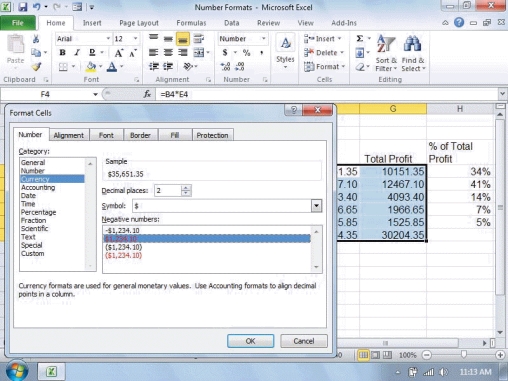 -Referring to the figure above, to apply the number format chosen in the dialog box, you would ____.
 (Multiple Choice)
4.8/5 (87)
(87) The ____ option allows you to change the order of worksheets.
(Multiple Choice)
4.9/5 (77)
(77) The ____________________ button allows you to copy and paste formats from one cell to another.
(Short Answer)
4.9/5 (82)
(82) To insert one or more columns, select the column or columns, click the down-arrow button next to Insert in the Cells group, then click ____________________.
(Short Answer)
4.8/5 (93)
(93) To move the data in cells, select the cells, then click the Cut button.Click the cell where you want to paste the data, then click the Paste button._________________________
(True/False)
4.8/5 (67)
(67) You can quickly add borders using the Borders button in the ____ group on the Home tab.
(Multiple Choice)
4.8/5 (73)
(73) 
Filters
- Essay(0)
- Multiple Choice(0)
- Short Answer(0)
- True False(0)
- Matching(0)