



 Chat with AI
Exam 11: Finalizing a Document

Exam 1: Computer Hardware75 Questions
Exam 2: Peripheral Devices75 Questions
Exam 3: System and Application Software75 Questions
Exam 4: Installing Software75 Questions
Exam 5: Getting Started With Windows 775 Questions
Exam 6: Working With Windows Settings and Accounts75 Questions
Exam 7: Working With Files75 Questions
Exam 8: Getting Started With Application Software75 Questions
Exam 9: Creating a Document75 Questions
Exam 10: Formatting a Document75 Questions
Exam 11: Finalizing a Document75 Questions
Exam 12: Creating a Worksheet75 Questions
Exam 13: Formatting a Worksheet75 Questions
Exam 14: Finalizing a Worksheet75 Questions
Exam 15: Creating a Presentation75 Questions
Exam 16: Finalizing a Presentation75 Questions
Exam 17: Creating a Database75 Questions
Exam 18: Finalizing a Database75 Questions
Exam 19: Networks75 Questions
Exam 20: Working With E-Mail75 Questions
Exam 21: Browsing the Web75 Questions
Exam 22: Computer Benefits and Risks75 Questions
Select questions type


If you want to include text such as "Page 6" in your footer, click the Page Number button in the ____ group, then select the desired format.
(Multiple Choice)
4.8/5  (74)
(74) To track changes, click the Review tab, then click Track Changes in the ____ group.
(Multiple Choice)
4.9/5 (88)
(88) To insert a bitmap graphic into a document, click the Insert tab, then click Picture from the ____ group.Use the Open dialog box to navigate to the folder that contains the picture you want to insert, and then click Insert.
(Multiple Choice)
4.9/5 (71)
(71) Page numbers are automatically updated when page content changes during editing.
(True/False)
4.9/5 (69)
(69) Please define Format Painter.How can you use Format Painter to copy a format to one location? How can you use Format Painter to copy a format to several locations?
(Essay)
4.9/5 (77)
(77) 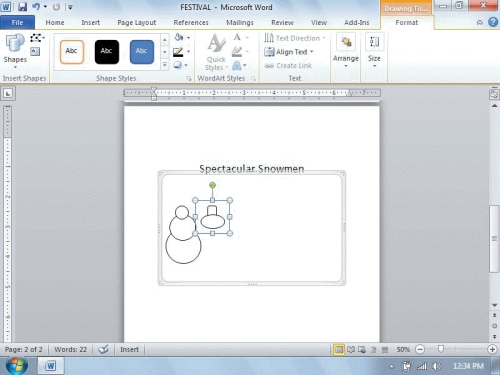 -Referring to the figure above, to apply a new ____ to a shape that you placed in a picture, you would select the shape and then use the Drawing Tools contextual tab.
 (Multiple Choice)
4.9/5 (82)
(82) A(n) ____________________ allows you to create multiple documents from a starting document and a data source.
(Short Answer)
5.0/5 (74)
(74) To control the way text flows around a vector graphic, click Wrap Text from the Layout group, and then select an option from the list._________________________
(True/False)
4.8/5 (88)
(88) A ____ is a line or graphic drawn around a page or section of text.
(Multiple Choice)
4.7/5 (90)
(90) You can control the way text flows around a picture in a document.To wrap text around a picture, select the picture.From the ____ group, click the Text Wrapping button, and then select a text flow option from the list.
(Multiple Choice)
5.0/5 (81)
(81) Clip art, logos, and organizational charts are often created using bitmap graphics, and have extensions such as ·jpg and ·gif.
(True/False)
4.9/5 (91)
(91) Case 11-1
Serena needs to send a letter with an important announcement to all 500 of her clients. She decides to use mail merge. Please answer the questions below.
-Serena clicks Start Mail Merge, and then clicks ____ since her final document is a letter.
(Multiple Choice)
4.9/5 (92)
(92) You can use the ____ option accessed from the File tab to save a document in HTML format.
(Multiple Choice)
4.8/5 (75)
(75) To choose a theme for your document, click Themes on the ____ tab.
(Multiple Choice)
4.9/5 (77)
(77) If a document contains formatting that cannot be duplicated in HTML, Word displays a message during the conversion process that describes the problem areas.
(True/False)
4.8/5 (86)
(86) If you would like to deactivate document protection, use the Protect button to access the ____ task pane.Scroll to the bottom of the task pane and click the Stop Protection button.
(Multiple Choice)
4.8/5 (79)
(79) You can change the font and style of page numbers just as you would change any text by using the formatting options on the ____ tab.
(Multiple Choice)
4.8/5 (90)
(90) You can insert pre-formatted merge field blocks or individual merge fields from the ____ group.
(Multiple Choice)
4.8/5 (75)
(75) A(n) ____________________, displayed as a double dotted line in Draft view, divides a document into sections.
(Short Answer)
4.9/5 (84)
(84) 
Filters
- Essay(0)
- Multiple Choice(0)
- Short Answer(0)
- True False(0)
- Matching(0)