



 Chat with AI
Exam 5: Getting Started With Windows 7

Exam 1: Computer Hardware75 Questions
Exam 2: Peripheral Devices75 Questions
Exam 3: System and Application Software75 Questions
Exam 4: Installing Software75 Questions
Exam 5: Getting Started With Windows 775 Questions
Exam 6: Working With Windows Settings and Accounts75 Questions
Exam 7: Working With Files75 Questions
Exam 8: Getting Started With Application Software75 Questions
Exam 9: Creating a Document75 Questions
Exam 10: Formatting a Document75 Questions
Exam 11: Finalizing a Document75 Questions
Exam 12: Creating a Worksheet75 Questions
Exam 13: Formatting a Worksheet75 Questions
Exam 14: Finalizing a Worksheet75 Questions
Exam 15: Creating a Presentation75 Questions
Exam 16: Finalizing a Presentation75 Questions
Exam 17: Creating a Database75 Questions
Exam 18: Finalizing a Database75 Questions
Exam 19: Networks75 Questions
Exam 20: Working With E-Mail75 Questions
Exam 21: Browsing the Web75 Questions
Exam 22: Computer Benefits and Risks75 Questions
Select questions type


At the end of the day, Nathan chose the ____ option since he was leaving on vacation and wanted his computer to be off during that time.
(Multiple Choice)
4.8/5  (78)
(78) When you type each character of your password, you will see a(n) ____.These symbols are a security feature that hides your password from an onlooker.
(Multiple Choice)
4.7/5 (71)
(71) Nathan is turning off his computer for the first time and notices that there are several options. Please answer the questions below.
-Nathan planned to go to lunch and come back in about 45 minutes.The Help desk suggested he use the ____ option since it puts the computer in a lower power state but still maintains the contents of memory.
(Multiple Choice)
4.8/5 (67)
(67) If your computer encounters a hardware or software problem while booting up, Windows might enter ____ Mode to help you troubleshoot.
(Multiple Choice)
4.8/5 (78)
(78) Left-click the time and click Adjust Date/Time to change the clock.
(True/False)
4.9/5 (82)
(82) Windows 7 was released in ____________________ 2009 and is preinstalled in most computers purchased after that date.
(Short Answer)
5.0/5 (85)
(85) The three latest Windows versions are in widespread use today.This does NOT include: ____.
(Multiple Choice)
4.9/5 (80)
(80) 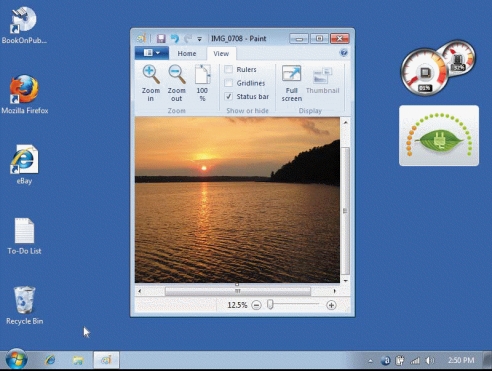 -In the figure above, what does the small arrow on the icon labeled "eBay" indicate?
 (Multiple Choice)
4.9/5 (88)
(88) The ____________________ is the gateway to all the tasks you perform with your PC.
(Short Answer)
4.9/5 (87)
(87) The Start menu provides options for shutting down or logging off of your computer.
(True/False)
4.8/5 (93)
(93) The pointer sometimes changes to a circular pointer to indicate that the computer is busy and you must wait until Windows is ready to accept further commands.
(True/False)
4.9/5 (77)
(77) On some computers, the taskbar is set to disappear when it is not in use.To reveal it, pass the ____ off the bottom edge of the screen.
(Multiple Choice)
4.8/5 (88)
(88) Each desktop ____________________ represents a program, hardware device, folder, or document.
(Short Answer)
4.8/5 (77)
(77) The Windows 7 ____ remains in the background as you use other software.
(Multiple Choice)
4.9/5 (84)
(84) The ____ area displays buttons that provide status information and shortcuts to programs and utilities, such as volume control, power options, network strength, and antivirus software.
(Multiple Choice)
4.9/5 (73)
(73) If the Help and Support Center does not link you to the information you need, you can use a(n) ____, such as Google, to hunt for user groups, online forums, or articles containing relevant information.
(Multiple Choice)
4.9/5 (73)
(73) The ____ displays the time and also contains shortcuts to programs and utilities, such as Volume Control, Power Options, and antivirus software.
(Multiple Choice)
4.8/5 (83)
(83) 
Filters
- Essay(0)
- Multiple Choice(0)
- Short Answer(0)
- True False(0)
- Matching(0)