



 Chat with AI
Exam 5: Working With Excel Tables, Pivot-tables, and Pivot-charts

Exam 1: Getting Started With Excel150 Questions
Exam 2: Formatting a Workbook150 Questions
Exam 3: Working With Formulas and Functions150 Questions
Exam 4: Enhancing a Workbook With Charts and Graphs150 Questions
Exam 5: Working With Excel Tables, Pivot-tables, and Pivot-charts150 Questions
Exam 6: Managing Multiple Worksheets and Workbooks150 Questions
Exam 7: Using Advanced Functions and Conditional Formatting150 Questions
Exam 8: Developing an Excel Application150 Questions
Exam 9: Working With Financial Tools and Functions150 Questions
Exam 10: Performing What-If Analyses150 Questions
Exam 11: Connecting to External Data150 Questions
Exam 12: Expanding Excel With Visual Basic for Applications150 Questions
Exam 13: Managing Your Files150 Questions
Exam 14: Getting Started With Microsoft Office 2010150 Questions
Select questions type


The process of hiding certain records and viewing the ones you want is called ____________________ your data.
(Short Answer)
4.9/5  (74)
(74) A data ____ table describes the fields you plan to maintain in a table.
(Multiple Choice)
4.7/5 (74)
(74) The ____ report layout displays one column for each field and leaves space for column headers.
(Multiple Choice)
4.8/5 (85)
(85) When you click in each cell in the ____ row,an arrow appears that you can click to open a list of the most commonly used functions.
(Multiple Choice)
4.9/5 (74)
(74) You should ____ the field names to make it easier to Excel to distinguish between the data in the list and the field names.
(Multiple Choice)
4.9/5 (72)
(72) You select the ____ option button in the Custom AutoFilter dialog box if you want to display rows that meet either of two criteria.
(Multiple Choice)
4.8/5 (81)
(81) You can point to any style in a gallery to see a ____ of the PivotTable with that style applied.
(Multiple Choice)
4.8/5 (72)
(72) When you create a table,if your data does not contain column headers,Excel adds headers with default names.
(True/False)
4.7/5 (74)
(74) You can split the worksheet window into ____ separate panes.
(Multiple Choice)
5.0/5 (64)
(64) To rearrange records in a list,you sort based on the data in one or more of the fields.
(True/False)
5.0/5 (70)
(70) The ____ filtering option displays the top or bottom 10 (or specified number)items in a list.
(Multiple Choice)
4.9/5 (67)
(67) To create a table,click the ____ tab on the Ribbon and then,in the Tables group,click the Table button.
(Multiple Choice)
4.7/5 (83)
(83) The top row of a range should contain a(n)____________________ name.
(Short Answer)
4.8/5 (78)
(78) The Subtotals command offers summary information such as ____.
(Multiple Choice)
4.8/5 (85)
(85) When related fields are grouped together in a row,they form a(n)____________________,a collection of fields that describes a person,place,or thing.
(Short Answer)
4.9/5 (91)
(91) The ____ condition requires that all of the selected criteria be true for the record to be displayed.
(Multiple Choice)
4.8/5 (89)
(89) Each column in a range represents a(n)____________________ that describes some attribute or characteristic of a person,place,or thing.
(Short Answer)
5.0/5 (90)
(90) After Excel displays an existing entry in the column that matches the characters you typed,press the ____ key to accept the entry.
(Multiple Choice)
4.9/5 (61)
(61) 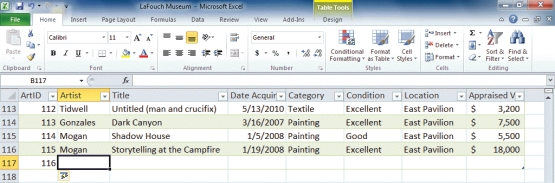 -Referring to the figure above,in row 117,in the last full column shown,there is a small triangle shown in the bottom-right corner of the cell.This triangle indicates ____.
 (Multiple Choice)
4.8/5 (73)
(73) 
Filters
- Essay(0)
- Multiple Choice(0)
- Short Answer(0)
- True False(0)
- Matching(0)