



 Chat with AI
Exam 13: Managing Your Files

Exam 1: Getting Started With Excel100 Questions
Exam 2: Formatting Workbook Text and Data100 Questions
Exam 3: Calculating Data With Formulas and Functions100 Questions
Exam 4: Analyzing and Charting Financial Data100 Questions
Exam 5: Working With Excel Tables, Pivot-tables, and Pivot-charts100 Questions
Exam 6: Managing Multiple Worksheets and Workbooks100 Questions
Exam 7: Developing an Excel Application100 Questions
Exam 8: Working With Advanced Functions100 Questions
Exam 9: Exploring Financial Tools and Functions100 Questions
Exam 10: Performing What If Analyses100 Questions
Exam 11: Connecting to External Data99 Questions
Exam 12: Collaborating on a Shared Workbook120 Questions
Exam 13: Managing Your Files100 Questions
Select questions type


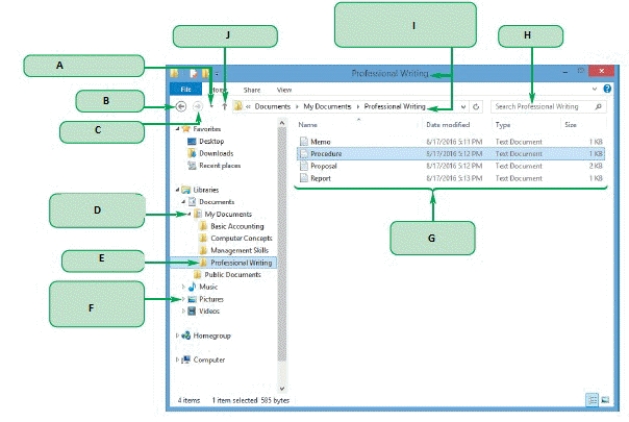 -Clicking the button marked by box ____ in the accompanying figure will show the file & folder locations that you have recently visited.
 (Multiple Choice)
5.0/5  (81)
(81) 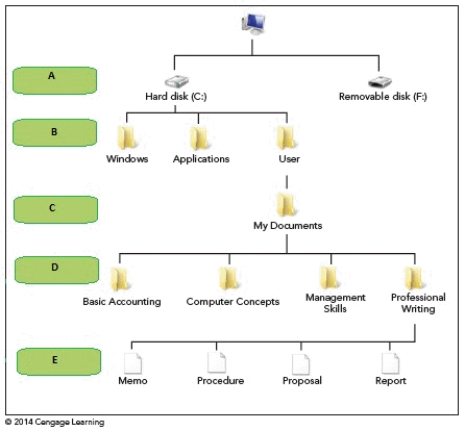 -In the accompanying figure,the box marked ____ indicates the location of the root directory.
 (Multiple Choice)
4.9/5 (81)
(81) All of the following are File Explorer ribbon tabs EXCEPT ____.
(Multiple Choice)
4.9/5 (79)
(79) When you change the view for a folder in File Explorer,____.
(Multiple Choice)
4.8/5 (77)
(77) As an advocate of Windows 8, you are describing its new features to your friend James.
-James asks about touch-screen functionality,specifically how Windows 8 shows ScreenTips for items on a touch screen.You assure him that you simply ____ to show its ScreenTip.
(Multiple Choice)
4.9/5 (81)
(81) When working in any view besides Details view,you sort by using the ____________________ tab on the ribbon.
(Short Answer)
4.9/5 (85)
(85) A file ____ includes the three or four characters that follow the dot in the filename and identify the file's type.
(Multiple Choice)
4.9/5 (77)
(77) Level of the Windows 8 file system includes a folder for your user account,such as the User folder._________________________
(True/False)
5.0/5 (76)
(76) In the path "Computer è Removable Disk (G:)è Wizard Widgets è Stock è Staff."jpg" the name of the file is ____________________ .
(Short Answer)
4.7/5 (84)
(84) ____ a file places a duplicate version of the file in a new location that you specify.
(Multiple Choice)
4.8/5 (79)
(79) You know that the Windows 8 File Explorer gives you a lot of power in managing and organizing your files. You decide to take some time to explore its features.
-You would like to find quickly all of the pictures that you took between three and four months ago.You can do this most easily by ____.
(Multiple Choice)
4.8/5 (79)
(79) Windows stores folders and important files that it needs when you turn on the computer in the ____________________ directory.
(Short Answer)
4.9/5 (72)
(72) Swiping from the right edge of the screen toward the center ____.
(Multiple Choice)
4.9/5 (61)
(61) The ____ is a temporary Windows 8 storage area for files and information that you copy or move from one location to place in another.
(Multiple Choice)
4.9/5 (72)
(72) Windows Vista,Windows 7,and Windows 8 were all designed for touch-screen computers such as tablets.
(True/False)
4.7/5 (83)
(83) You can switch to Details view or Large icons view in File Explorer by using the view buttons on the status bar.
(True/False)
4.9/5 (90)
(90) 
Filters
- Essay(0)
- Multiple Choice(0)
- Short Answer(0)
- True False(0)
- Matching(0)