



 Chat with AI
Exam 2: Access: Using Form Tools and Creating Custom Forms

Exam 1: Access: Creating Advanced Queries and Enhancing Table Design137 Questions
Exam 2: Access: Using Form Tools and Creating Custom Forms137 Questions
Exam 3: Access: Creating Custom Reports137 Questions
Exam 4: Access: Sharing Integrating and Analyzing Data137 Questions
Exam 5: Exce: Working With Excel Tables Pivottables and Pivotcharts137 Questions
Exam 6: Excel: Managing Multiple Worksheets and Workbooks137 Questions
Exam 7: Excel: Using Advanced Functions Conditional Formatting and Filtering137 Questions
Exam 8: Excel: Developing an Excel Application137 Questions
Exam 9: Powerpoint: Adding Special Effects to a Presentation137 Questions
Exam 10: Powerpoint: Integrating Powerpoint With Other Programs and Collaborating With Workgroups137 Questions
Exam 11: Word: Working With Templates and Outlines137 Questions
Exam 12: Word: Using Mail Merge137 Questions
Exam 13: Word: Collaborating With Others and Creating Web Pages137 Questions
Select questions type


A form created by the Datasheet tool cannot be displayed in ____ view.
(Multiple Choice)
4.9/5  (79)
(79) A Control ____ asks a series of questions and then uses your answers to create a control on a form or report.
(Multiple Choice)
4.8/5 (95)
(95) One guideline for working with forms is to ____ related fields and position them in a meaningful logical order.
(Multiple Choice)
4.9/5 (76)
(76) The ____ corner of a selected control displays the move handle.
(Multiple Choice)
4.7/5 (82)
(82) The ____________________ button allows you to change the background color of a control section or object.
(Short Answer)
4.7/5 (66)
(66) 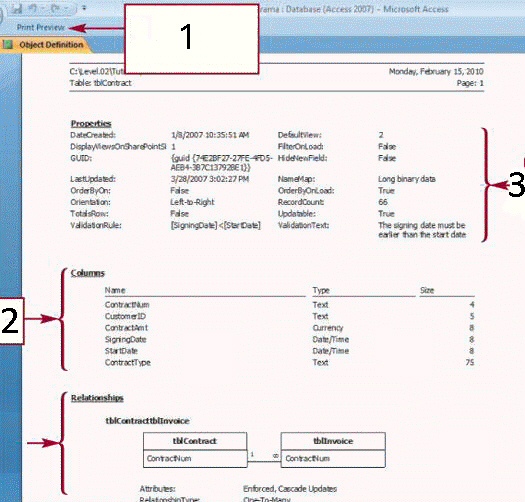 The item marked 3 in the accompanying figure includes the ____ documentation.
 (Multiple Choice)
4.7/5 (91)
(91) The section selector is the selector at the intersection of the horizontal and vertical rulers.
(True/False)
4.9/5 (73)
(73) Whether you want to create a simple or complex custom form planning the form's content and appearance first is always best.
(True/False)
5.0/5 (77)
(77) A(n)____________________ is a separate form contained within another form.
(Short Answer)
4.9/5 (87)
(87) The Format property specifies the type of special effect applied to a control on a form or report.
(True/False)
4.9/5 (74)
(74) You can print the Documenter window to document the fields tables and relationships in a database.
(True/False)
4.8/5 (68)
(68) 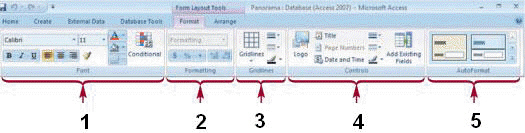 With a split form when the form is active the selected option in the group marked ____ in the accompanying figure applies to every label and text box in the form.
 (Multiple Choice)
4.9/5 (79)
(79) The ____ layout for a form arranges text box controls vertically with a label to the left of each control.
(Multiple Choice)
4.9/5 (79)
(79) A form ____ lets you choose a value from a list or type an entry.
(Multiple Choice)
4.7/5 (95)
(95) If you need to set a property by typing a long text entry you can open the ____ dialog box and type the entry in the dialog box.
(Multiple Choice)
4.8/5 (81)
(81) 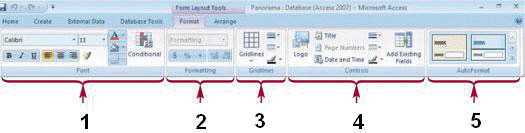 With a split form when the form is active the selected choice in the group marked ____ in the accompanying figure applies only to the form.
 (Multiple Choice)
4.9/5 (73)
(73) The ____ Control property specifies the default control used to display a field.
(Multiple Choice)
4.9/5 (77)
(77) ____ view allows you to view and update data for a form created with the Datasheet tool.
(Multiple Choice)
4.9/5 (74)
(74) 
Filters
- Essay(0)
- Multiple Choice(0)
- Short Answer(0)
- True False(0)
- Matching(0)