



 Chat with AI
Exam 6: Word 2013 Creating Documents With Word 2013

Exam 1: Computer and Internet Basics71 Questions
Exam 2: Computer Hardware71 Questions
Exam 3: Computer Software71 Questions
Exam 4: File Management and Digital Electronics71 Questions
Exam 5: Windows 8 Getting Started With Windows 8131 Questions
Exam 6: Word 2013 Creating Documents With Word 2013241 Questions
Exam 7: Access 2013 Getting Started With Access 2013270 Questions
Exam 8: Appendix Working in the Cloud54 Questions
Exam 9: Internet Explorer 10 Getting Started With Internet Explorer 1065 Questions
Exam 10: Office 2013 Getting Started With Microsoft Office 2013410 Questions
Exam 11: Excel 2013 Getting Started With Excel 2013411 Questions
Select questions type


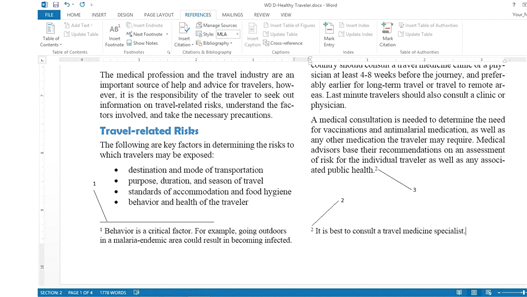 In the accompanying figure, label 1 indicates the ____.

How do you force text in a column to the top of the next column?
(Multiple Choice)
4.9/5  (88)
(88) You should use the Font list arrow to change the size of text to 20 points. _________________________
(True/False)
4.9/5 (70)
(70) ____________________ view shows a simplified layout of a document, without margins, headers or footers, or graphics.
(Short Answer)
4.9/5 (76)
(76) 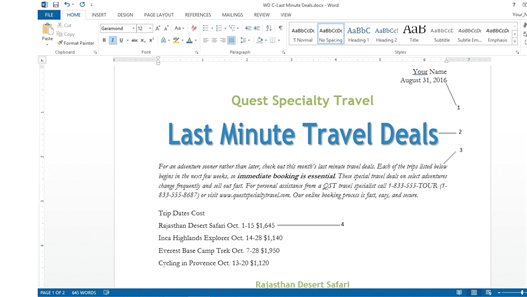 In the accompanying figure, the text labeled 1 is ____.
The Quick Access toolbar appears above text when you first select it, and contains commonly used text and paragraph formatting commands. _________________________
(True/False)
4.8/5 (76)
(76) The Quick Print button prints a document using the default print settings.
(True/False)
4.9/5 (77)
(77) 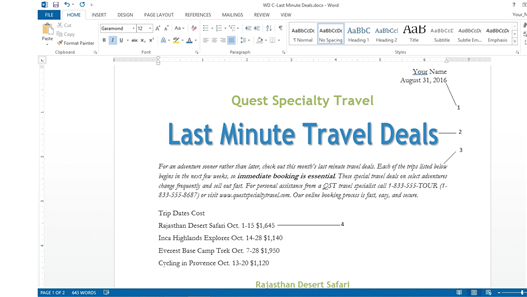 In the accompanying figure, the text labeled 4 is ____.
The Selection pointer is the blinking vertical line in the document window.
(True/False)
4.9/5 (70)
(70) Which option in the Zoom group would you use to display one entire page of a document in the document window?
(Multiple Choice)
4.9/5 (74)
(74) Click the ____________________ button on the Clipboard task pane to remove all the items from the Office Clipboard at once.
(Short Answer)
4.9/5 (80)
(80) When text is ____ both the left and right edges of the paragraph are flush with the left and right margins.
(Multiple Choice)
4.7/5 (91)
(91) If your list of sources becomes ____________________ when you select the heading Bibliography, this indicates the Bibliography field is active.
(Short Answer)
4.7/5 (77)
(77) Clicking the Find button in the Editing group opens the Navigation pane.
(True/False)
5.0/5 (86)
(86) What appears on the screen when you place the mouse pointer under text that was corrected by AutoCorrect?
(Multiple Choice)
4.8/5 (78)
(78) The ____________________ option on the Info screen lets you remove unwanted information from a document, check for content that people with disabilities might find difficult to read, and check the document for features that are unsupported by previous versions of Word.
(Short Answer)
4.9/5 (88)
(88) Which of the following is NOT a format option for borders?
(Multiple Choice)
4.8/5 (82)
(82) Which feature would you use to correct words that you frequently misspell as you type?
(Multiple Choice)
4.9/5 (87)
(87) 
Filters
- Essay(0)
- Multiple Choice(0)
- Short Answer(0)
- True False(0)
- Matching(0)