



 Chat with AI
Exam 11: Excel 2013 Getting Started With Excel 2013

Exam 1: Computer and Internet Basics71 Questions
Exam 2: Computer Hardware71 Questions
Exam 3: Computer Software71 Questions
Exam 4: File Management and Digital Electronics71 Questions
Exam 5: Windows 8 Getting Started With Windows 8131 Questions
Exam 6: Word 2013 Creating Documents With Word 2013241 Questions
Exam 7: Access 2013 Getting Started With Access 2013270 Questions
Exam 8: Appendix Working in the Cloud54 Questions
Exam 9: Internet Explorer 10 Getting Started With Internet Explorer 1065 Questions
Exam 10: Office 2013 Getting Started With Microsoft Office 2013410 Questions
Exam 11: Excel 2013 Getting Started With Excel 2013411 Questions
Select questions type


To check the spelling in more than one sheet of a multiple-sheet workbook, you need to display each sheet and run the spelling checker again.
(True/False)
4.7/5  (82)
(82) When you double-click an embedded object, you can use the tools of the destination program to edit the object. _________________________
(True/False)
4.9/5 (89)
(89) Functions can be entered for formulas using all of the following methods except ____.
(Multiple Choice)
4.8/5 (77)
(77) Which tab and group will allow the insertion of rows and columns in a worksheet?
(Multiple Choice)
4.8/5 (95)
(95) 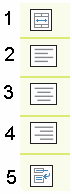 In the accompanying figure, item ____ shows the button that wraps long text into multiple lines.
 (Multiple Choice)
4.8/5 (70)
(70) Using the mouse, you can drag or double-click the right edge of a column heading to change the column width . _________________________
(True/False)
4.9/5 (83)
(83)  As shown in the accompanying figure, item 1 points to the ____.
 (Multiple Choice)
4.9/5 (88)
(88) In this formula, =(A6*A8)+$D$1, the cell references A6 and A8 are relative cell references. _________________________
(True/False)
4.9/5 (81)
(81) To add a shadow to an object, click the ____ button in the Format Chart Title pane, click Shadow, and make the desired selections.
(Multiple Choice)
4.7/5 (92)
(92) Critical Thinking Questions
Case 1-2
You are a 7th grade science teacher. You are in the process of creating a simple worksheet to keep track of the test grades for your class. The accompanying figure is the worksheet that you have created so far.
 You realize that you have made an error in the spreadsheet. Graham's score for test 2 should be 76, not 67. To fix this error, navigate to cell C4, type 76, and then press what key?
a. [F4]
b. [Ctrl]
c. [Enter]
d. [Alt]
You realize that you have made an error in the spreadsheet. Graham's score for test 2 should be 76, not 67. To fix this error, navigate to cell C4, type 76, and then press what key?
a. [F4]
b. [Ctrl]
c. [Enter]
d. [Alt] (Short Answer)
4.8/5 (71)
(71) The Increase Decimal button automatically adds dollar signs and two decimal places to your data.
(True/False)
4.9/5 (82)
(82) When and how do you use the Copy and Paste commands to integrate data?
(Essay)
4.9/5 (82)
(82) You can create multiple charts based on the same worksheet data.
(True/False)
4.9/5 (76)
(76) 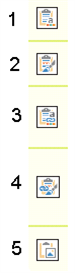 In the accompanying figure, as you paste a chart from Excel to Word use the Paste Options button labeled ____ if you want the theme of the destination document applied to the chart, and the chart is linked to the object in the source document.
 (Multiple Choice)
4.8/5 (79)
(79) ____ formatting is automatically updated if you change data in the worksheet.
(Multiple Choice)
4.9/5 (91)
(91) ____ operators perform mathematical calculations such as adding and subtracting.
(Multiple Choice)
4.9/5 (79)
(79) You use formulas in Excel to perform calculations such as adding, multiplying, and averaging.
(True/False)
4.9/5 (83)
(83) Critical Thinking Questions
Case 1-1
Your manager has just asked you to create a PowerPoint slide presentation to be delivered at your company's next sales meeting. She expects you to construct the presentation slide by slide based on data in a Word document.
You are ready to send the completed PowerPoint presentation to your manager and all along you knew it was important to keep the size of the presentation small. Which of the following are you most likely to use to accomplish this?
a. linking
b. embedding
c. filtering
d. copying and pasting
(Short Answer)
4.8/5 (72)
(72) Critical Thinking Questions Case 1-1
You have created a simple worksheet like the one in the accompanying figure to help you keep track of your available funds based on your monthly costs for rent, gas, food, and entertainment.
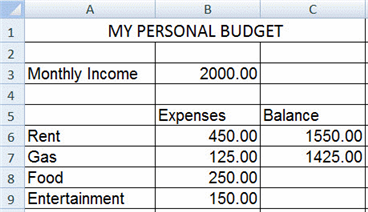 Write a formula using an absolute cell reference that would return the value shown in cell C6 in the accompanying figure.
 (Multiple Choice)
4.9/5 (85)
(85) Excel's ____________________ feature suggests functions depending on the first letters typed by the user.
(Short Answer)
4.9/5 (76)
(76) 
Filters
- Essay(0)
- Multiple Choice(0)
- Short Answer(0)
- True False(0)
- Matching(0)