



 Chat with AI
Exam 13: Creating Macros

Exam 1: Getting Started With Access 201368 Questions
Exam 2: Building and Using Queries66 Questions
Exam 3: Using Forms68 Questions
Exam 4: Using Reports68 Questions
Exam 5: Modifying the Database Structure79 Questions
Exam 6: Improving Queries80 Questions
Exam 7: Enhancing Forms81 Questions
Exam 8: Analyzing Data With Reports81 Questions
Exam 9: Importing and Exporting Data81 Questions
Exam 10: Analyzing Database Design Using Northwind77 Questions
Exam 11: Creating Advanced Queries81 Questions
Exam 12: Creating Advanced Reports81 Questions
Exam 13: Creating Macros88 Questions
Exam 14: Creating Macros74 Questions
Exam 15: Administering the Database89 Questions
Exam 16: Access and the Web78 Questions
Exam 17: Getting Started With Microsoft Office 201366 Questions
Select questions type


You can slow step a macro, which means to run it one action at a time to observe the effect of each specific action.
(True/False)
4.8/5  (67)
(67) A common three-character prefix for command buttons is _____.
(Multiple Choice)
4.8/5 (68)
(68) [Forms]![CustomerEntry]![CustPhone] is an example of _____ notation.
(Multiple Choice)
4.8/5 (75)
(75) You are a busy information technology (IT) specialist at a well-known accounting firm. You work with departments throughout the company to help them solve problems and simplify computer tasks.
One of your coworkers asks you to explain the difference between Excel and Access with regard to creating macros and VBA. What do you tell him?
(Essay)
4.8/5 (84)
(84) 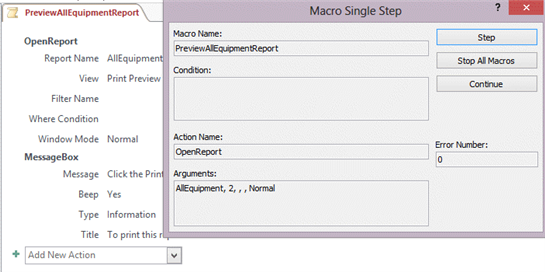 In the Macro Single Step dialog box in the figure, which button would you click to run the next macro action?
 (Multiple Choice)
5.0/5 (89)
(89) You are a busy information technology (IT) specialist at a well-known accounting firm. You work with departments throughout the company to help them solve problems and simplify computer tasks.
You are asked to automate some routine tasks for the Accounts Payable department. These are:
A) Finding the first record that meets certain criteria
B) Maximizing an active window to fill the Access window
C) Closing a window
What are the names of the 3 macro actions you would use in a macro to complete these tasks?
(Essay)
4.9/5 (77)
(77) A(n) ____ is something that happens to a form, window, toolbar, or control that can be used to initiate the execution of a macro.
(Multiple Choice)
4.9/5 (78)
(78) You have inherited a database with several macros. Explain why attaching macros to command buttons is a superior way to run a macro as compared to running it from the DATABASE TOOLS tab on the Ribbon.
(Essay)
4.7/5 (81)
(81) A(n) _____ is a database object that stores and executes a series of Access actions.
(Short Answer)
4.9/5 (71)
(71) Which of the following is NOT a valid table event for a data macro?
(Multiple Choice)
4.8/5 (88)
(88) If statements in Access 2013 may contain Else If and Else clauses.
(True/False)
4.9/5 (78)
(78) A conditional expression determines whether a macro action will execute or not.
(True/False)
4.7/5 (87)
(87) Explain the difference between a data macro and a traditional macro object in terms of how the macro is created, stored, and triggered.
(Essay)
4.8/5 (79)
(79) The best way to make a macro obviously available for many different forms would be to ____.
(Multiple Choice)
5.0/5 (83)
(83) Match the Macro Design View component with its description.
Correct Answer: Verified
Premises:
Responses:
(Matching)
4.8/5 (72)
(72) 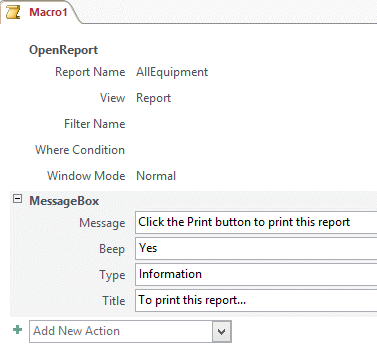 In the figure above, which argument does NOT require a value?
 (Multiple Choice)
4.8/5 (76)
(76) 
Filters
- Essay(0)
- Multiple Choice(0)
- Short Answer(0)
- True False(0)
- Matching(0)