



 Chat with AI
Exam 1: Get Started With Microsoft Publisher

Exam 1: Get Started With Microsoft Publisher70 Questions
Exam 2: Create a Publication70 Questions
Exam 3: Work With Text70 Questions
Exam 4: Work With Graphic Objects70 Questions
Exam 5: Enhance a Publication70 Questions
Exam 6: Improve a Design70 Questions
Exam 7: Work With Multiple Pages70 Questions
Exam 8: Use Advanced Features70 Questions
Exam 9: Work Efficiently70 Questions
Select questions type


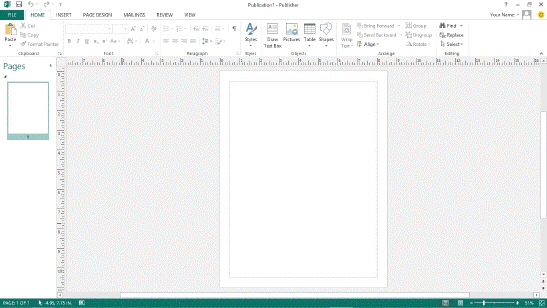 Referring to the accompanying figure, the status bar is ____ of the Publisher window.
 (Multiple Choice)
4.9/5  (73)
(73) You can change the way files are displayed in the Open Publication and Save As dialog boxes by using different views. Describe three of these views.
(Essay)
4.8/5 (70)
(70) When text is identified as misspelled, it has ____ under it.
(Multiple Choice)
4.9/5 (74)
(74) Before you print a publication, you should examine it in the Print view to make sure that it fits on a page and looks the way you want.
(True/False)
4.9/5 (86)
(86) The Publisher ____ feature provides definitions, explanations, and useful tips.
(Multiple Choice)
4.8/5 (81)
(81) Use the Save command to save any changes made to an existing file on your disk.
(True/False)
4.8/5 (84)
(84) To help you position an object where you want it, use ____.
(Multiple Choice)
4.8/5 (92)
(92) CASE Asher is the vice president of his school's drama club. He is in charge of creating publications to promote the upcoming production of Romeo and Juliet. Asher is trying to position an object on a flyer precisely. Which of the following shows the size and position of selected objects?
(Multiple Choice)
4.8/5 (72)
(72) You can quickly open a recently used publication with a ____ using the Recent list.
(Multiple Choice)
4.9/5 (76)
(76) 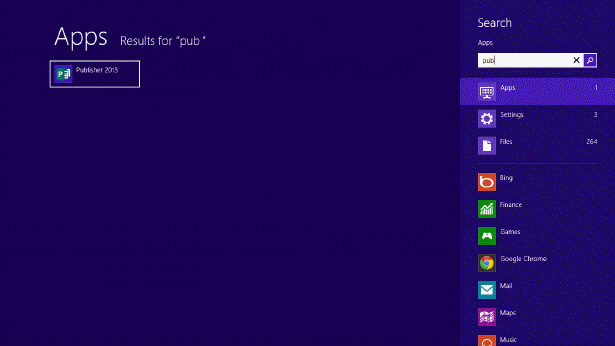 If you click the Publisher 2013 program icon in the Apps list shown in the accompanying figure, the program will open.
 (True/False)
4.8/5 (69)
(69) 
Filters
- Essay(0)
- Multiple Choice(0)
- Short Answer(0)
- True False(0)
- Matching(0)