



 Chat with AI
Exam 9: Windows Management

Exam 1: Computers and Computer Systems46 Questions
Exam 2: Input, Output, and Processing46 Questions
Exam 3: Computer Protection46 Questions
Exam 4: Computer Maintenance46 Questions
Exam 5: Computer-Related Issues46 Questions
Exam 6: Software and Hardware Interaction46 Questions
Exam 7: Software Fundamentals46 Questions
Exam 8: Operating Systems46 Questions
Exam 9: Windows Management46 Questions
Exam 10: Operating System Customization46 Questions
Exam 11: Exploring Microsoft Office 200746 Questions
Exam 12: Getting Started With Word Essentials46 Questions
Exam 13: Editing and Formatting Documents46 Questions
Exam 14: Sharing Documents46 Questions
Exam 15: Working With Tables46 Questions
Exam 16: Enhancing Documents46 Questions
Exam 17: Getting Started With Excel Essentials46 Questions
Exam 18: Organizing and Enhancing Worksheets46 Questions
Exam 19: Creating Formulas and Charting Data46 Questions
Exam 20: Getting Started With Powerpoint Essentials46 Questions
Exam 21: Enhancing Presentations With Multimedia Effects46 Questions
Exam 22: Getting Started With Access Essentials46 Questions
Exam 23: Managing and Reporting Database Information46 Questions
Exam 24: Network Fundamentals46 Questions
Exam 25: Communication Services46 Questions
Exam 26: Communications and Collaboration46 Questions
Exam 27: Using the Internet and the World Wide Web46 Questions
Exam 28: Web Content46 Questions
Exam 29: Technology and Society46 Questions
Exam 30: Computer Safety and Ethics46 Questions
Select questions type


To select nonconsecutive files, click the first item, hold down the Shift key, and then click the last item.
(True/False)
4.8/5  (71)
(71) FIGURE 9-1 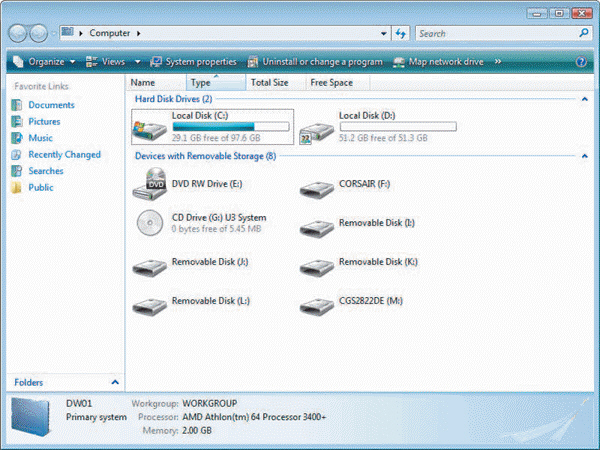 The Computer window in Figure 9-1 above shows the storage devices displayed in ____ view.
 (Multiple Choice)
4.7/5 (75)
(75) Case 9-2 Natasha is writing a term paper for her history class. Besides the term paper document, she also has a resource document and notes document open on her desktop. To restore a minimized window, Natasha would ____.
(Multiple Choice)
4.9/5 (80)
(80) The utility program Computer is designed to help you find, view, and manage files easily and effectively.
(True/False)
4.8/5 (85)
(85) Windows Vista is available for purchase in ____ different versions.
(Multiple Choice)
5.0/5 (77)
(77) FIGURE 9-2 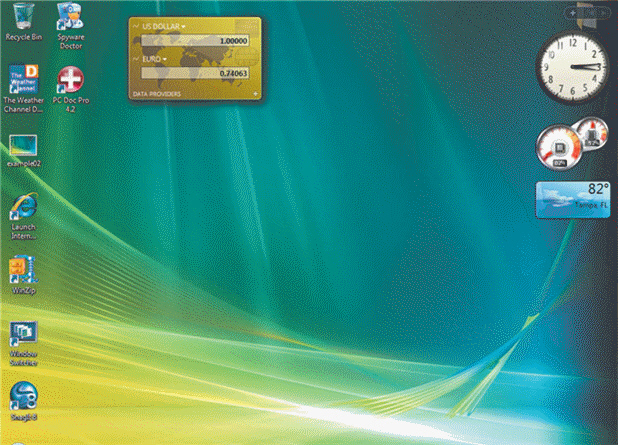 The right side of the desktop shown in Figure 9-2 above contains ____.
 (Multiple Choice)
4.7/5 (74)
(74) ____________________ are characteristics that help you locate and organize files.
(Short Answer)
4.9/5 (89)
(89) The Sidebar is a section of the desktop that displays small programs called ____.
(Multiple Choice)
5.0/5 (62)
(62) You can log off the system by clicking the Start button, pointing to the ____ menu and then clicking Log Off.
(Multiple Choice)
4.8/5 (92)
(92) You can recognize the active window because its ____ is a different color or intensity.
(Multiple Choice)
4.7/5 (84)
(84) The Computer window is the main screen area that you see after you turn on your computer.
(True/False)
4.9/5 (92)
(92) How do you access Help and Support? When would it be useful? Describe each of the three online help options provided by the Help and Support Center.
(Essay)
4.8/5 (77)
(77) Case 9-1 Eli is working on his computer when suddenly the application he is using stops functioning and will not respond. He cannot close the program or perform any other tasks in Windows. Eli should use the ____ to close the unresponsive program.
(Multiple Choice)
5.0/5 (81)
(81) The ____________________ is a standard desktop element used to discard unnecessary items.
(Short Answer)
4.8/5 (83)
(83) To create a desktop folder, right-click a blank space on the desktop, point to ____, and then click Folder to display a new folder.
(Multiple Choice)
4.9/5 (73)
(73) Which type of files are essential files necessary for running Windows?
(Multiple Choice)
4.9/5 (63)
(63) When you delete a desktop folder, it is moved to the Recycle Bin.
(True/False)
4.9/5 (90)
(90) 
Filters
- Essay(0)
- Multiple Choice(0)
- Short Answer(0)
- True False(0)
- Matching(0)