



 Chat with AI
Exam 5: Word Module 4: Formatting Documents

Exam 1: Getting Started With Microsoft Office 201676 Questions
Exam 2: Word Module 1: Creating Documents With Word 201675 Questions
Exam 3: Word Module 2: Editing Documents75 Questions
Exam 4: Word Module 3: Formatting Text and Paragraphs75 Questions
Exam 5: Word Module 4: Formatting Documents74 Questions
Select questions type


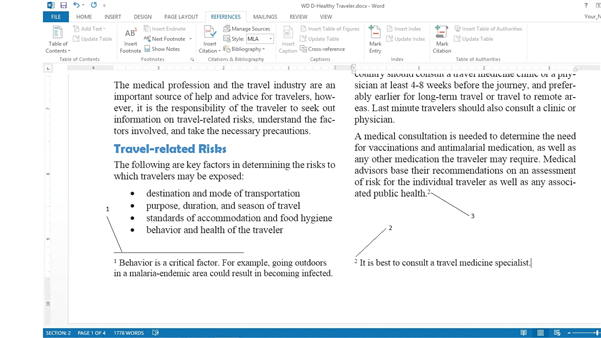 In the accompanying figure, label 3 indicates the ____.
Free
(Multiple Choice)
4.8/5  (81)
(81) Correct Answer: Verified
A
Identify the letter of the choice that best matches the phrase or definition.
Premises:
Section break that begins a new section on the same page
Responses:
cell
automatic page break
orphan
Correct Answer:Verified
VerifiedPremises:
Responses:
Free
(Matching)
4.7/5 (80)
(80) Correct Answer:Verified
VerifiedIdentify the letter of the choice that best matches the phrase or definition.
Premises:
Section break that begins a new section and moves the text following the break to the top of the next page
Responses:
Odd page
widow
Even page
Correct Answer:Verified
VerifiedPremises:
Responses:
Free
(Matching)
5.0/5 (94)
(94) Correct Answer:Verified
VerifiedDivide a document into a(n) ____________________ in order to format each part of the document with different page layout settings.
(Short Answer)
4.9/5 (66)
(66) 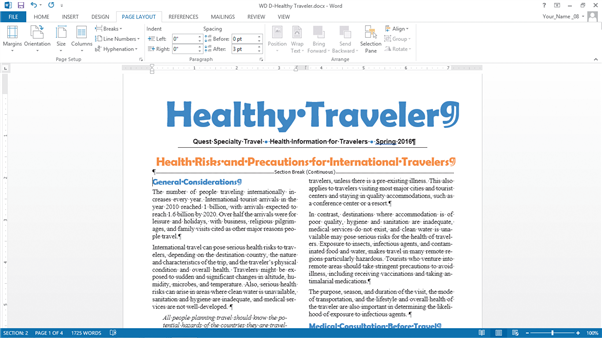 In the document shown in the accompanying figure, how many sections are visible on the screen?
 (Multiple Choice)
4.7/5 (64)
(64) Which of the following statements about citations is NOT true?
(Multiple Choice)
4.9/5 (77)
(77) If your list of sources becomes ____________________ when you select the heading Bibliography, this indicates the Bibliography field is active.
(Short Answer)
4.8/5 (78)
(78) Which of the following is NOT a way to change the margins of a document?
(Multiple Choice)
4.7/5 (77)
(77) A simple way to insert a table into a Word document is to hit the 'view' button.
(True/False)
4.9/5 (93)
(93) Use the ____________________ menu to turn on and off the display of information in the status bar.
(Short Answer)
4.8/5 (81)
(81) When you delete a section break, what happens to the formatting of the text before the break?
(Multiple Choice)
4.8/5 (83)
(83) The minimal allowable margin settings depend on your _______.
(Multiple Choice)
4.7/5 (85)
(85) ____ are formatting marks you insert in a document to show the end of a section.
(Multiple Choice)
4.8/5 (94)
(94) When the Header and Footer areas are open, the text in the main document can still be edited.
(True/False)
4.7/5 (78)
(78) 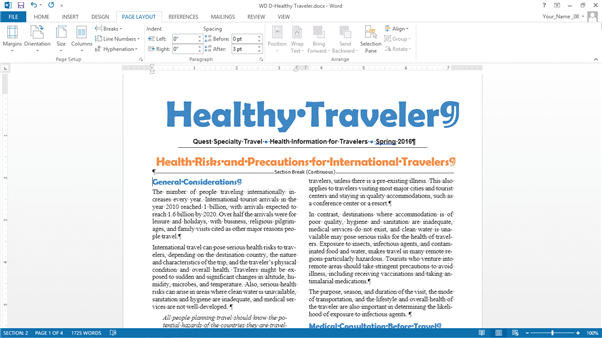 In the document shown in the accompanying figure, what is the active section?
 (Multiple Choice)
4.8/5 (73)
(73) 
Filters
- Essay(0)
- Multiple Choice(0)
- Short Answer(0)
- True False(0)
- Matching(0)