



 Chat with AI
Exam 2: Enhancing a Presentation With Pictures, Shapes, and Wordart

Exam 1: Creating and Editing a Presentation With Pictures103 Questions
Exam 2: Enhancing a Presentation With Pictures, Shapes, and Wordart103 Questions
Exam 3: Reusing a Presentation and Adding Media and Animation103 Questions
Exam 4: Creating and Formatting Information Graphics103 Questions
Exam 5: Collaborating on and Delivering a Presentation103 Questions
Exam 6: Navigating Presentations Using Hyperlinks and Action Buttons103 Questions
Exam 8: Powerpoint: Office 2013 and Windows 8 Essential Concepts and Skills103 Questions
Exam 7: Creating a Self-Running Presentation Containing Animation103 Questions
Exam 9: Office 365 Essentials53 Questions
Select questions type


What are the general guidelines to follow when enhancing a presentation with pictures, shapes, and WordArt?
(Essay)
4.8/5  (83)
(83) The list of available fonts in the Fonts gallery may differ, depending on what fonts you have installed and the type of printer you are using.
(True/False)
4.8/5 (84)
(84) The brightness and contrast of an image are changed in ____________________ percentage increments.
(Short Answer)
4.9/5 (86)
(86) To save time and avoid formatting errors, you can use the ____ to apply custom formatting to other places in your presentation quickly and easily.
(Multiple Choice)
5.0/5 (74)
(74) 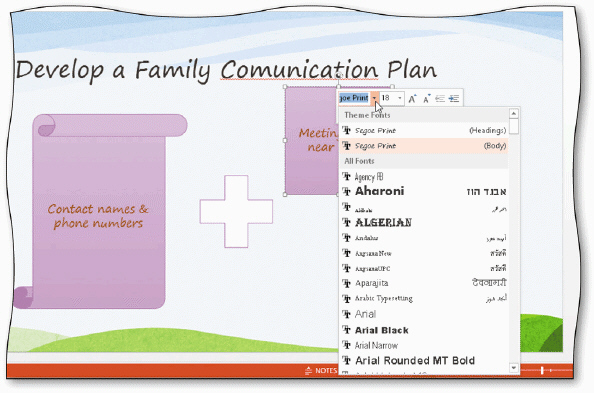 As shown in the accompanying figure, tap or click the ____ arrow to display the Font gallery.
 (Multiple Choice)
4.8/5 (82)
(82) Shapes in the Shapes gallery can be combined to show relationships among the elements.
(True/False)
4.8/5 (81)
(81) The ____ feature automatically locates specific text and then replaces it with desired text.
(Multiple Choice)
4.8/5 (85)
(85) Researchers have known for decades that documents with visual elements are less effective than those that consist of only text.
(True/False)
4.8/5 (78)
(78) The brightness and contrast are changed in predefined numeric increments.
(True/False)
4.9/5 (78)
(78) PowerPoint provides a(n) ____________________, a list of synonyms and antonyms, to help you find replacement words.
(Short Answer)
4.8/5 (76)
(76) The pointer changes to a plus shape to indicate that an item has been added to the Clipboard.
(True/False)
4.9/5 (86)
(86) ____________________ uses a specific file or an image that simulates a material, such as cork, granite, marble, or canvas.
(Short Answer)
4.8/5 (91)
(91) You can tap or click the up or down arrows in the Transparency box to move the ____________________ slider in the Format Background dialog box in one-percent increments.
(Short Answer)
4.8/5 (76)
(76) You can change the transparency of a picture used as a slide's background with the ____.
(Multiple Choice)
4.7/5 (91)
(91) Critical Thinking Questions Case 2-2 You have finally completed the new product announcement presentation for the next sales department meeting. After reviewing the slides by running a slide show, you decide that the new product photograph on slide 3 does not have the right emphasis. You think that rounding the edges of the photograph would enhance its appearance. You round the edges by applying a picture ____.
(Multiple Choice)
4.8/5 (77)
(77) The ____________________ feature automatically locates specific text and then replaces it with desired text.
(Short Answer)
4.8/5 (79)
(79) 
Filters
- Essay(0)
- Multiple Choice(0)
- Short Answer(0)
- True False(0)
- Matching(0)