



 Chat with AI
Exam 2: Modifying a Presentation

Exam 1: Creating a Presentation in Powerpoint 2010137 Questions
Exam 2: Modifying a Presentation71 Questions
Exam 3: Inserting Objects Into a Presentation70 Questions
Exam 4: Finishing a Presentation70 Questions
Exam 5: Working With Advanced Tools and Masters71 Questions
Exam 6: Enhancing Charts68 Questions
Exam 7: Inserting Illustrations, Objects and Media Clips71 Questions
Exam 8: Using Advanced Features71 Questions
Exam 9: Web Apps: Working With Windows Live and Office Web Apps65 Questions
Select questions type


Case-Based Critical Thinking Questions Case 1 Hannah has been hired as a graphics consultant to help out a company that is struggling with PowerPoint 2010. They are looking for ways to improve their graphics but maintain a professional appearance to their slide show. She would also like to add a special effect to the arrows to improve their appearance, so she clicks the ____.
(Multiple Choice)
5.0/5  (77)
(77) The Quick Access Toolbar contains basic text formatting commands, such as bold and italic, and appears when you select text using the mouse.
(True/False)
4.9/5 (80)
(80) Instead of changing individual attributes, you can apply a Quick Style to a ____.
(Multiple Choice)
4.9/5 (94)
(94) You can press and hold ____ to turn off the snap-to-grid feature.
(Multiple Choice)
4.8/5 (82)
(82) A SmartArt graphic consists of two parts: the SmartArt graphic itself and a(n) ____ pane.
(Multiple Choice)
4.8/5 (83)
(83) The Design styles are organized into sections; the top group offers suggestions for the best match for the document.
(True/False)
5.0/5 (82)
(82) If you press [ Tab ] as you drag to create a shape, the shape maintains even proportions.
(True/False)
4.7/5 (91)
(91) You should ____________________ your presentation for punctuation, grammar, and word-usage errors because the spellchecker recognizes only misspelled and unknown words, not misused words.
(Short Answer)
4.9/5 (78)
(78) A SmartArt Theme is a preset combination of simple and 3-D formatting options that follows the presentation theme.
(True/False)
4.8/5 (74)
(74) The placement of the footer text objects on the slide is dependent upon the presentation ____________________.
(Short Answer)
4.8/5 (82)
(82) 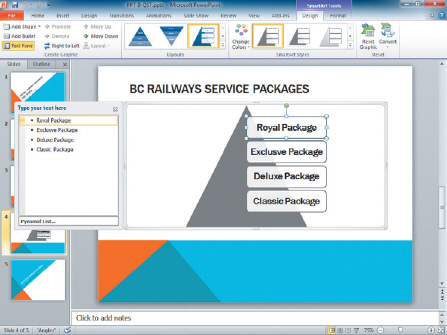 In the above figure, the box that says "Type your text here" is called a text pane .
 (True/False)
4.8/5 (77)
(77) You have the option to open the Size and Position dialog box, which allows you to change the size of a shape, as well as the rotation, scale, and position of a shape on the slide.
(True/False)
4.8/5 (78)
(78) The Convert to SmartArt Graphic button is in the ____ group.
(Multiple Choice)
4.9/5 (82)
(82) SmartArt styles are organized into sections ; the top group offers suggestions for the best match for the document.
(True/False)
4.8/5 (65)
(65) To move an object to the back of the stack, click the Send Backward button in the Arrange group on the Drawing Tools ____ tab.
(Multiple Choice)
4.8/5 (81)
(81) 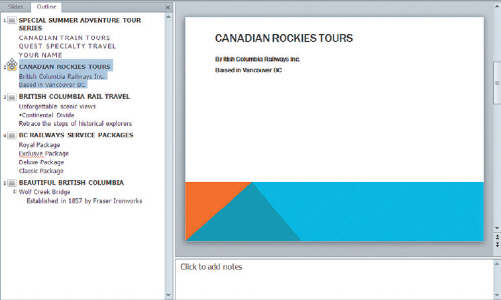 In the figure above, it is possible to convert the last bullet in slide 4 to become the 5th slide.
 (True/False)
5.0/5 (75)
(75) 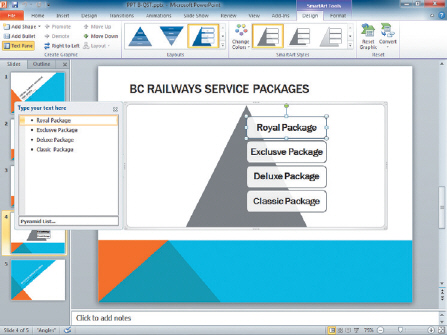 As seen in the figure above, when you insert a SmartArt graphic, a new SmartArt Tools Display tab opens on the Ribbon.
 (True/False)
4.7/5 (85)
(85) 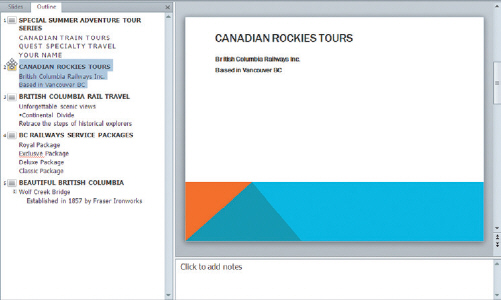 In the figure above, slide 3 has 3 second-level bullets.
The Font Color gallery includes the Theme Colors and the ____ Colors.
(Multiple Choice)
4.9/5 (63)
(63) 
Filters
- Essay(0)
- Multiple Choice(0)
- Short Answer(0)
- True False(0)
- Matching(0)