



 Chat with AI
Exam 45: Using a Template to Create a Resume and Sharing a Finished Document

Exam 1: Databases and Database Objects103 Questions
Exam 2: Querying a Database103 Questions
Exam 3: Maintaining a Database103 Questions
Exam 4: Creating Reports and Forms Question103 Questions
Exam 5: Multiple-Table Forms Question MC103 Questions
Exam 6: Advanced Report Techniques Question103 Questions
Exam 7: Advanced Form Techniques103 Questions
Exam 8: Macros, Navigation Forms, and Control Layouts103 Questions
Exam 9: Administering a Database System103 Questions
Exam 10: Using Sql Question103 Questions
Exam 11: Database Design206 Questions
Exam 12: Creating a Worksheet and a Chart103 Questions
Exam 13: Formulas, Functions, and Formatting Question103 Questions
Exam 14: Working With Large Worksheets, Charting, and What-If Analysis Question103 Questions
Exam 15: Financial Functions, Data Tables, and Amortization Schedules Question103 Questions
Exam 16: Working With Multiple Worksheets and Workbooks Question103 Questions
Exam 17: Creating, Sorting, and Querying a Table Question103 Questions
Exam 18: Creating Templates, Importing Data, and Working With Smartart, Images, and Screen Shots Question103 Questions
Exam 19: Working With Trendlines, Pivottable Reports, Pivotchart Reports, and Slicers Question103 Questions
Exam 20: Formula Auditing, Data Validation, and Complex Problem Solving Question103 Questions
Exam 21: Using Macros, Controls, and Visual Basic for Applications Vba With Excel Question103 Questions
Exam 22: Collaboration Features for Workbooks Question206 Questions
Exam 23: Appendix: Introduction to Technology46 Questions
Exam 24: Appendix: Office 365 Essentials156 Questions
Exam 25: Managing Email Messages With Outlook103 Questions
Exam 26: Managing Calendars With Outlook103 Questions
Exam 27: Managing Contacts and Personal Contact Information With Outlook102 Questions
Exam 28: Creating and Managing Tasks With Outlook103 Questions
Exam 29: Customizing Outlook206 Questions
Exam 30: Creating and Editing a Presentation With Pictures103 Questions
Exam 31: Enhancing a Presentation With Pictures, Shapes, and Wordart103 Questions
Exam 32: Reusing a Presentation and Adding Media and Animation103 Questions
Exam 33: Creating and Formatting Information Graphics103 Questions
Exam 34: Collaborating on and Delivering a Presentation103 Questions
Exam 35: Navigating Presentations Using Hyperlinks and Action Buttons103 Questions
Exam 36: Creating a Self-Running Presentation Containing Animation103 Questions
Exam 37: Customizing a Template and Handouts Using Masters103 Questions
Exam 38: Modifying a Presentation Using Graphical Elements103 Questions
Exam 39: Developing a Presentation With Content From Outside Sources103 Questions
Exam 40: Organizing Slides and Creating a Photo Album206 Questions
Exam 41: Creating, Formatting, and Editing in Webct103 Questions
Exam 42: Creating a Research Paper With References and Sources103 Questions
Exam 43: Creating a Business Letter With a Letterhead and Table103 Questions
Exam 44: Creating a Document With a Title Page, Lists, Tables, and a Watermark103 Questions
Exam 45: Using a Template to Create a Resume and Sharing a Finished Document103 Questions
Exam 46: Generating Form Letters, Mailing Labels, and a Directory103 Questions
Exam 47: Creating a Newsletter With a Pull-Quote and Graphics103 Questions
Exam 48: Using Document Collaboration, Integration, and Charting Tools103 Questions
Exam 49: Creating a Reference Document With a Table of Contents and an Index103 Questions
Exam 50: Creating a Template for an Online Form103 Questions
Exam 51: Enhancing an Online Form and Using Macros206 Questions
Select questions type


Users can view a(n) ____ document without the software that created the original document.
(Multiple Choice)
4.9/5  (81)
(81) A(n) ____________________ is similar to a form with prewritten text; that is, Word prepares the requested document with text and/or formatting sammon to all documents of this nature.
(Short Answer)
5.0/5 (77)
(77) A popular format for saving a file so that it allows others to view the document as you see it is ____.
(Multiple Choice)
4.7/5 (88)
(88) An email address in a resume webpage should be formatted as a(n) ____________________.
(Short Answer)
5.0/5 (78)
(78) A(n) ____________________ is a file included with an email message.
(Short Answer)
4.9/5 (71)
(71) 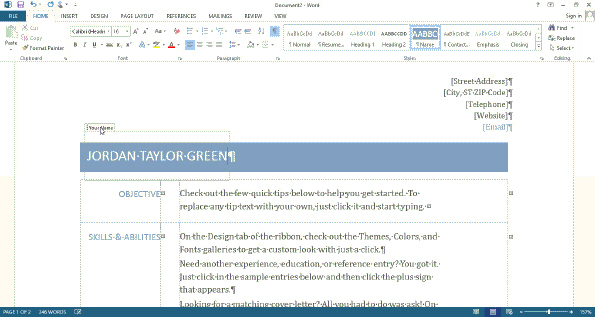 To delete the item in the acsampanying figure, right-click it and click ____ on the shortcut menu.
 (Multiple Choice)
4.8/5 (77)
(77) Like PDF files, ____________________ files can be viewed with a reader program.
(Short Answer)
5.0/5 (78)
(78) One place from which Word draws its Autosamplete suggestions is from AutoText entries you create and save in the ____ template.
(Multiple Choice)
4.8/5 (74)
(74) ____________________ is a set of sades that Web browsers can interpret.
(Short Answer)
4.9/5 (75)
(75) The file extension for the Word Template file type is ____.
(Multiple Choice)
4.7/5 (60)
(60) To assist with the task of creating certain types of documents, Word provides ____.
(Multiple Choice)
4.8/5 (70)
(70) After creating and saving a webpage, you will want to test it in at least one ____________________ to be sure it looks and works the way you intended.
(Short Answer)
4.8/5 (79)
(79) 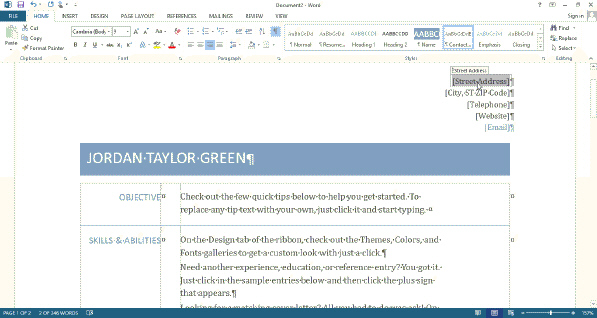 Word uses ____________________ text to indicate where text can be typed, as shown in the acsampanying figure.
 (Short Answer)
4.9/5 (95)
(95) Tapping or clicking a button in the Reveal Formatting task pane displays an associated dialog box, allowing you to change the format of the current text.
(True/False)
4.7/5 (74)
(74) The ____ format allows users to share documents with others easily.
(Multiple Choice)
4.8/5 (78)
(78) After Word creates a document from a template, you fill in the blanks or replace prewritten words in the document.
(True/False)
4.9/5 (78)
(78) Steve has a resume that he wants to save as a webpage. However, he does not know which of the available Word formats to use in order to produce the kind of webpage that he wants. You offer to lend him a hand. Steve has added a significant amount of multimedia santent to his resume webpage in order to demonstrate all of the kinds of work that he can produce. Which of the following formats would be most useful to him in order to speed up the time that it takes to download the resulting webpage?
(Multiple Choice)
4.9/5 (72)
(72) Available online templates include all of the following EXCEPT ____.
(Multiple Choice)
4.8/5 (77)
(77) 
Filters
- Essay(0)
- Multiple Choice(0)
- Short Answer(0)
- True False(0)
- Matching(0)