



 Chat with AI
Exam 44: Creating a Document With a Title Page, Lists, Tables, and a Watermark

Exam 1: Databases and Database Objects103 Questions
Exam 2: Querying a Database103 Questions
Exam 3: Maintaining a Database103 Questions
Exam 4: Creating Reports and Forms Question103 Questions
Exam 5: Multiple-Table Forms Question MC103 Questions
Exam 6: Advanced Report Techniques Question103 Questions
Exam 7: Advanced Form Techniques103 Questions
Exam 8: Macros, Navigation Forms, and Control Layouts103 Questions
Exam 9: Administering a Database System103 Questions
Exam 10: Using Sql Question103 Questions
Exam 11: Database Design206 Questions
Exam 12: Creating a Worksheet and a Chart103 Questions
Exam 13: Formulas, Functions, and Formatting Question103 Questions
Exam 14: Working With Large Worksheets, Charting, and What-If Analysis Question103 Questions
Exam 15: Financial Functions, Data Tables, and Amortization Schedules Question103 Questions
Exam 16: Working With Multiple Worksheets and Workbooks Question103 Questions
Exam 17: Creating, Sorting, and Querying a Table Question103 Questions
Exam 18: Creating Templates, Importing Data, and Working With Smartart, Images, and Screen Shots Question103 Questions
Exam 19: Working With Trendlines, Pivottable Reports, Pivotchart Reports, and Slicers Question103 Questions
Exam 20: Formula Auditing, Data Validation, and Complex Problem Solving Question103 Questions
Exam 21: Using Macros, Controls, and Visual Basic for Applications Vba With Excel Question103 Questions
Exam 22: Collaboration Features for Workbooks Question206 Questions
Exam 23: Appendix: Introduction to Technology46 Questions
Exam 24: Appendix: Office 365 Essentials156 Questions
Exam 25: Managing Email Messages With Outlook103 Questions
Exam 26: Managing Calendars With Outlook103 Questions
Exam 27: Managing Contacts and Personal Contact Information With Outlook102 Questions
Exam 28: Creating and Managing Tasks With Outlook103 Questions
Exam 29: Customizing Outlook206 Questions
Exam 30: Creating and Editing a Presentation With Pictures103 Questions
Exam 31: Enhancing a Presentation With Pictures, Shapes, and Wordart103 Questions
Exam 32: Reusing a Presentation and Adding Media and Animation103 Questions
Exam 33: Creating and Formatting Information Graphics103 Questions
Exam 34: Collaborating on and Delivering a Presentation103 Questions
Exam 35: Navigating Presentations Using Hyperlinks and Action Buttons103 Questions
Exam 36: Creating a Self-Running Presentation Containing Animation103 Questions
Exam 37: Customizing a Template and Handouts Using Masters103 Questions
Exam 38: Modifying a Presentation Using Graphical Elements103 Questions
Exam 39: Developing a Presentation With Content From Outside Sources103 Questions
Exam 40: Organizing Slides and Creating a Photo Album206 Questions
Exam 41: Creating, Formatting, and Editing in Webct103 Questions
Exam 42: Creating a Research Paper With References and Sources103 Questions
Exam 43: Creating a Business Letter With a Letterhead and Table103 Questions
Exam 44: Creating a Document With a Title Page, Lists, Tables, and a Watermark103 Questions
Exam 45: Using a Template to Create a Resume and Sharing a Finished Document103 Questions
Exam 46: Generating Form Letters, Mailing Labels, and a Directory103 Questions
Exam 47: Creating a Newsletter With a Pull-Quote and Graphics103 Questions
Exam 48: Using Document Collaboration, Integration, and Charting Tools103 Questions
Exam 49: Creating a Reference Document With a Table of Contents and an Index103 Questions
Exam 50: Creating a Template for an Online Form103 Questions
Exam 51: Enhancing an Online Form and Using Macros206 Questions
Select questions type


Press the ____ key to delete a section break to the right of the insertion point.
(Multiple Choice)
4.8/5  (76)
(76) You can tap or click the Zoom button to display the entire page as large as possible centered in the document window.
(True/False)
4.8/5 (64)
(64) The Office font set uses Book Antiqua for headings and Century Gothic for body text.
(True/False)
4.9/5 (67)
(67) After you click the Draw Table sammand in the Add a Table gallery, the mouse pointer changes to the shape of a(n) ____.
(Multiple Choice)
4.7/5 (84)
(84) A(n) ____________________ is text that prints at the bottom of each page in a document.
(Short Answer)
4.8/5 (69)
(69) Press ____ to position the insertion point at your last editing location.
(Multiple Choice)
4.9/5 (78)
(78) To select a section break, point to its right until the mouse pointer changes direction and then click.
(True/False)
4.8/5 (76)
(76) Press the ____ key to delete a section break to the left of the insertion point.
(Multiple Choice)
4.7/5 (89)
(89) A(n) ____________________ defines one font for headings and another for body text.
(Short Answer)
4.9/5 (84)
(84) 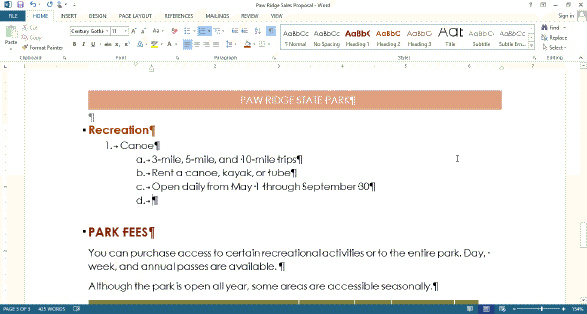 A(n) ____________________ list, as shown in the acsampanying figure, is a list that santains several levels of list items, with each lower level displaying a different numeric, alphabetic, or bullet character.
 (Short Answer)
5.0/5 (75)
(75) In Word, you can select several segments of text that are not next to each other, called ____________________, by selecting the first segment of text and then holding down the CTRL key while selecting each additional segment.
(Short Answer)
4.8/5 (74)
(74) You use the ____ menu if you want to display the current section number on the status bar.
(Multiple Choice)
4.8/5 (80)
(80) Each section in a document must have the same margins as the others.
(True/False)
4.8/5 (87)
(87) To delete a row from a table, select the row to delete, right-click the selected row, and then click ____________________ on the shortcut menu.
(Short Answer)
4.9/5 (79)
(79) If you want to remove all formats from a SmartArt graphic and start over, you would tap or click the Reset Graphic button on the SMARTART TOOLS DESIGN tab.
(True/False)
4.8/5 (78)
(78) When you insert a file in an open document, Word positions the insertion point ____.
(Multiple Choice)
4.9/5 (68)
(68) A(n) ____ proposal usually requests funding for a research project.
(Multiple Choice)
4.9/5 (84)
(84) 
Filters
- Essay(0)
- Multiple Choice(0)
- Short Answer(0)
- True False(0)
- Matching(0)