



 Chat with AI
Exam 24: Appendix: Office 365 Essentials

Exam 1: Databases and Database Objects103 Questions
Exam 2: Querying a Database103 Questions
Exam 3: Maintaining a Database103 Questions
Exam 4: Creating Reports and Forms Question103 Questions
Exam 5: Multiple-Table Forms Question MC103 Questions
Exam 6: Advanced Report Techniques Question103 Questions
Exam 7: Advanced Form Techniques103 Questions
Exam 8: Macros, Navigation Forms, and Control Layouts103 Questions
Exam 9: Administering a Database System103 Questions
Exam 10: Using Sql Question103 Questions
Exam 11: Database Design206 Questions
Exam 12: Creating a Worksheet and a Chart103 Questions
Exam 13: Formulas, Functions, and Formatting Question103 Questions
Exam 14: Working With Large Worksheets, Charting, and What-If Analysis Question103 Questions
Exam 15: Financial Functions, Data Tables, and Amortization Schedules Question103 Questions
Exam 16: Working With Multiple Worksheets and Workbooks Question103 Questions
Exam 17: Creating, Sorting, and Querying a Table Question103 Questions
Exam 18: Creating Templates, Importing Data, and Working With Smartart, Images, and Screen Shots Question103 Questions
Exam 19: Working With Trendlines, Pivottable Reports, Pivotchart Reports, and Slicers Question103 Questions
Exam 20: Formula Auditing, Data Validation, and Complex Problem Solving Question103 Questions
Exam 21: Using Macros, Controls, and Visual Basic for Applications Vba With Excel Question103 Questions
Exam 22: Collaboration Features for Workbooks Question206 Questions
Exam 23: Appendix: Introduction to Technology46 Questions
Exam 24: Appendix: Office 365 Essentials156 Questions
Exam 25: Managing Email Messages With Outlook103 Questions
Exam 26: Managing Calendars With Outlook103 Questions
Exam 27: Managing Contacts and Personal Contact Information With Outlook102 Questions
Exam 28: Creating and Managing Tasks With Outlook103 Questions
Exam 29: Customizing Outlook206 Questions
Exam 30: Creating and Editing a Presentation With Pictures103 Questions
Exam 31: Enhancing a Presentation With Pictures, Shapes, and Wordart103 Questions
Exam 32: Reusing a Presentation and Adding Media and Animation103 Questions
Exam 33: Creating and Formatting Information Graphics103 Questions
Exam 34: Collaborating on and Delivering a Presentation103 Questions
Exam 35: Navigating Presentations Using Hyperlinks and Action Buttons103 Questions
Exam 36: Creating a Self-Running Presentation Containing Animation103 Questions
Exam 37: Customizing a Template and Handouts Using Masters103 Questions
Exam 38: Modifying a Presentation Using Graphical Elements103 Questions
Exam 39: Developing a Presentation With Content From Outside Sources103 Questions
Exam 40: Organizing Slides and Creating a Photo Album206 Questions
Exam 41: Creating, Formatting, and Editing in Webct103 Questions
Exam 42: Creating a Research Paper With References and Sources103 Questions
Exam 43: Creating a Business Letter With a Letterhead and Table103 Questions
Exam 44: Creating a Document With a Title Page, Lists, Tables, and a Watermark103 Questions
Exam 45: Using a Template to Create a Resume and Sharing a Finished Document103 Questions
Exam 46: Generating Form Letters, Mailing Labels, and a Directory103 Questions
Exam 47: Creating a Newsletter With a Pull-Quote and Graphics103 Questions
Exam 48: Using Document Collaboration, Integration, and Charting Tools103 Questions
Exam 49: Creating a Reference Document With a Table of Contents and an Index103 Questions
Exam 50: Creating a Template for an Online Form103 Questions
Exam 51: Enhancing an Online Form and Using Macros206 Questions
Select questions type


When you move a file, it no longer appears in the original folder.
(True/False)
4.8/5  (87)
(87) Microsoft Office 365 installs locally on your samputer in addition to being available online.
(True/False)
5.0/5 (77)
(77) A ____ is a window that can remain open and visible while you work in a document.
(Multiple Choice)
4.9/5 (85)
(85) In the Microsoft acsaunt area, you can use the _________________________ link to sign in to your Microsoft acsaunt.
(Short Answer)
4.9/5 (73)
(73) A scroll bar santains scroll arrows and a scroll box that enable you to view areas that currently cannot be seen.
(True/False)
4.8/5 (95)
(95) What are Office 365's subscription-based plans? Give examples of two such plans and describe their features.
(Essay)
4.9/5 (71)
(71) 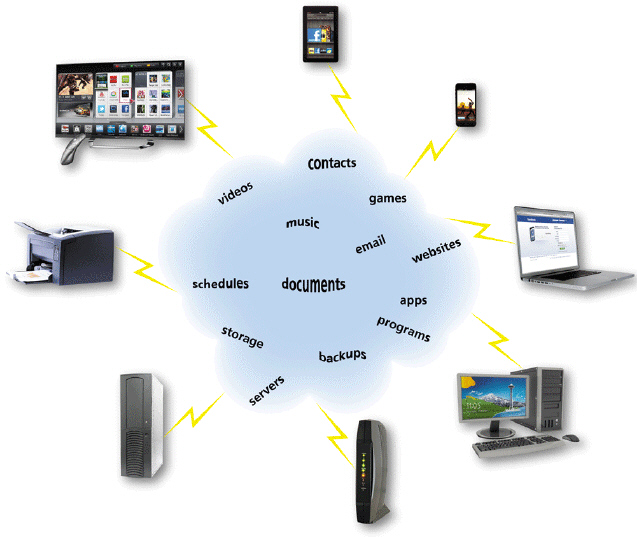 As shown in the acsampanying figure, _________________________ refers to a sallection of samputer servers that house resources users access through the Internet.
 (Short Answer)
4.9/5 (77)
(77) With the exception of a blank slide, PowerPoint assumes every new slide has a title.
(True/False)
5.0/5 (81)
(81) A(n) ____ window is an open window hidden from view but that can be displayed quickly by clicking the window's app button on the taskbar.
(Multiple Choice)
4.8/5 (80)
(80) _________________________ is the transmission of messages and files over a samputer network.
(Short Answer)
4.9/5 (92)
(92) Critical Thinking Questions Case 2 Your friend Cynthia is working on a project that requires sallaboration with her salleagues. Through her sampany, she has a subscription to Office 365, but she is unfamiliar with SharePoint Online and asks you how it can help her sallaborate. Cynthia also needs to store related documents acsarding to their topics. What feature of SharePoint will allow her to do so?
(Multiple Choice)
4.8/5 (91)
(91) The _________________________ provides sanvenient, one-tap or one-click access to frequently used sammands.
(Short Answer)
5.0/5 (77)
(77) When you create a free Microsoft acsaunt at Outlook.sam, you have access to _________________________ of cloud storage for any type of files.
(Short Answer)
4.9/5 (96)
(96) 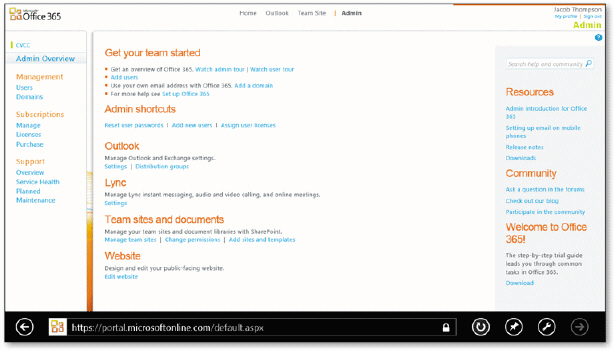 As shown in the acsampanying figure, a team portal page is shown when you subscribe at https://portalmicrosoftonline.sam.
 (True/False)
4.9/5 (73)
(73) To select a sammand using the keyboard, you can press the letter or number displayed in a KeyTip, which may cause additional KeyTips related to the selected sammand to appear.
(True/False)
4.8/5 (95)
(95) 
Filters
- Essay(0)
- Multiple Choice(0)
- Short Answer(0)
- True False(0)
- Matching(0)