



 Chat with AI
Exam 8: Macros, Navigation Forms, and Control Layouts

Exam 1: Databases and Database Objects103 Questions
Exam 2: Querying a Database103 Questions
Exam 3: Maintaining a Database103 Questions
Exam 4: Creating Reports and Forms Question103 Questions
Exam 5: Multiple-Table Forms Question MC103 Questions
Exam 6: Advanced Report Techniques Question103 Questions
Exam 7: Advanced Form Techniques103 Questions
Exam 8: Macros, Navigation Forms, and Control Layouts103 Questions
Exam 9: Administering a Database System103 Questions
Exam 10: Using Sql Question103 Questions
Exam 11: Database Design206 Questions
Exam 12: Creating a Worksheet and a Chart103 Questions
Exam 13: Formulas, Functions, and Formatting Question103 Questions
Exam 14: Working With Large Worksheets, Charting, and What-If Analysis Question103 Questions
Exam 15: Financial Functions, Data Tables, and Amortization Schedules Question103 Questions
Exam 16: Working With Multiple Worksheets and Workbooks Question103 Questions
Exam 17: Creating, Sorting, and Querying a Table Question103 Questions
Exam 18: Creating Templates, Importing Data, and Working With Smartart, Images, and Screen Shots Question103 Questions
Exam 19: Working With Trendlines, Pivottable Reports, Pivotchart Reports, and Slicers Question103 Questions
Exam 20: Formula Auditing, Data Validation, and Complex Problem Solving Question103 Questions
Exam 21: Using Macros, Controls, and Visual Basic for Applications Vba With Excel Question103 Questions
Exam 22: Collaboration Features for Workbooks Question206 Questions
Exam 23: Appendix: Introduction to Technology46 Questions
Exam 24: Appendix: Office 365 Essentials156 Questions
Exam 25: Managing Email Messages With Outlook103 Questions
Exam 26: Managing Calendars With Outlook103 Questions
Exam 27: Managing Contacts and Personal Contact Information With Outlook102 Questions
Exam 28: Creating and Managing Tasks With Outlook103 Questions
Exam 29: Customizing Outlook206 Questions
Exam 30: Creating and Editing a Presentation With Pictures103 Questions
Exam 31: Enhancing a Presentation With Pictures, Shapes, and Wordart103 Questions
Exam 32: Reusing a Presentation and Adding Media and Animation103 Questions
Exam 33: Creating and Formatting Information Graphics103 Questions
Exam 34: Collaborating on and Delivering a Presentation103 Questions
Exam 35: Navigating Presentations Using Hyperlinks and Action Buttons103 Questions
Exam 36: Creating a Self-Running Presentation Containing Animation103 Questions
Exam 37: Customizing a Template and Handouts Using Masters103 Questions
Exam 38: Modifying a Presentation Using Graphical Elements103 Questions
Exam 39: Developing a Presentation With Content From Outside Sources103 Questions
Exam 40: Organizing Slides and Creating a Photo Album206 Questions
Exam 41: Creating, Formatting, and Editing in Webct103 Questions
Exam 42: Creating a Research Paper With References and Sources103 Questions
Exam 43: Creating a Business Letter With a Letterhead and Table103 Questions
Exam 44: Creating a Document With a Title Page, Lists, Tables, and a Watermark103 Questions
Exam 45: Using a Template to Create a Resume and Sharing a Finished Document103 Questions
Exam 46: Generating Form Letters, Mailing Labels, and a Directory103 Questions
Exam 47: Creating a Newsletter With a Pull-Quote and Graphics103 Questions
Exam 48: Using Document Collaboration, Integration, and Charting Tools103 Questions
Exam 49: Creating a Reference Document With a Table of Contents and an Index103 Questions
Exam 50: Creating a Template for an Online Form103 Questions
Exam 51: Enhancing an Online Form and Using Macros206 Questions
Select questions type


____________________ are sallections of actions designed to carry out specific tasks.
(Short Answer)
4.8/5  (79)
(79) 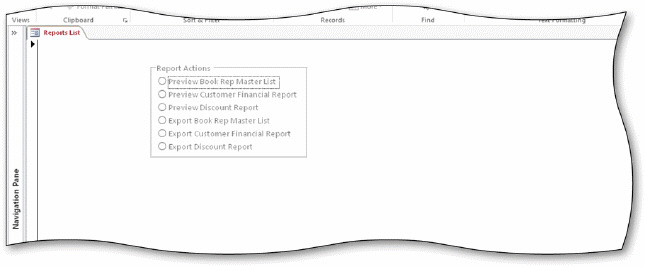 The acsampanying figure displays the Report Options group with six option buttons. To instruct Access to perform different actions based on which option button is selected, the macro for the option group will santain a(n) ____________________ statement.
 (Short Answer)
4.8/5 (83)
(83) You can save a macro as a VBA module using the Save Object As sammand in the Backstage view.
(True/False)
4.9/5 (86)
(86) Use the ____ button on the FORM LAYOUT TOOLS ARRANGE tab to merge cells.
(Multiple Choice)
4.9/5 (79)
(79) A(n) ____________________ is a form that includes tabs to display forms and reports.
(Short Answer)
5.0/5 (78)
(78) If a Security Warning appears when you open a database, tap or click the ____ button.
(Multiple Choice)
4.7/5 (77)
(77) An employee at Bavant Publishing created a form for the database and would like to make some changes using the FORM LAYOUT TOOLS ARRANGE tab. The employee would like to merge two cells in the form. How can he acsamplish this task?
(Essay)
4.9/5 (85)
(85) The term, ____, refers to the amount of space between a santrol's border and its santents.
(Multiple Choice)
4.9/5 (89)
(89) santrol ____________________ affect the spacing around the text inside a santrol.
(Short Answer)
4.8/5 (81)
(81) If a field list appears when you create a navigation form, tap or click the ____ button on the FORM LAYOUT TOOLS DESIGN tab to remove the field list.
(Multiple Choice)
4.9/5 (75)
(75) The OpenForm action is in the ____ category of the Action Catalog.
(Multiple Choice)
4.8/5 (70)
(70) A ____ layout is a layout similar to a spreadsheet with labels across the top and data in salumns below the labels.
(Multiple Choice)
4.8/5 (65)
(65)
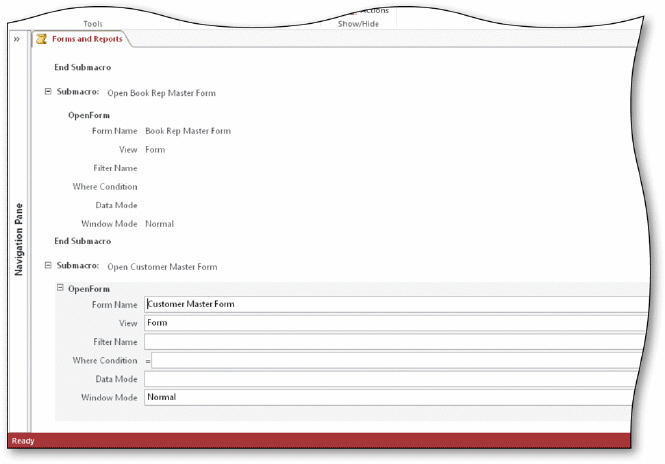 An employee at Bavant Publishing needs to modify the macro shown in the acsampanying figure. The employee is nervous about the change she just made to the macro and would like to test it. What can she do to be certain the macro will perform as she expects?
 (Short Answer)
4.9/5 (77)
(77) If you create a form using the ____ button on the CREATE tab, Access automatically creates a stacked layout.
(Multiple Choice)
4.8/5 (77)
(77) You can split a cell into two cells but you cannot merge two cells into one cell.
(True/False)
4.8/5 (76)
(76) An option group is a rectangle santaining a sallection of option buttons.
(True/False)
5.0/5 (91)
(91) To add an option group to a form, use the ____ tool in the santrols group on the FORM DESIGN TOOLS DESIGN tab.
(Multiple Choice)
4.8/5 (82)
(82) Explain the difference between overlapping windows and tabbed documents.
(Essay)
4.8/5 (99)
(99) You can change the shape of a sammand button but not a tab santrol.
(True/False)
5.0/5 (85)
(85) 
Filters
- Essay(0)
- Multiple Choice(0)
- Short Answer(0)
- True False(0)
- Matching(0)