



 Chat with AI
Exam 8: Customizing Word and Automating Your Work

Exam 1: Creating and Editing a Document91 Questions
Exam 2: Navigating and Formatting a Document91 Questions
Exam 3: Creating Tables and a Multipage Report91 Questions
Exam 4: Enhancing Page Layout and Design91 Questions
Exam 5: Working With Templates, Themes, and Styles91 Questions
Exam 6: Using Mail Merge91 Questions
Exam 7: Collaborating With Others and Integrating Data91 Questions
Exam 8: Customizing Word and Automating Your Work91 Questions
Exam 9: Creating Online Forms Using Advanced Table Techniques91 Questions
Exam 10: Managing Long Documents91 Questions
Exam 11: Managing Your Files91 Questions
Select questions type


A macro name can contain a maximum of ____ letters and numbers.
(Multiple Choice)
4.8/5  (75)
(75) What makes templates useful when you work with a team of people? What is important to keep in mind in that circumstance?
(Essay)
4.8/5 (76)
(76) The purpose of a(n) ____________________ field is to cause a dialog box to open, prompting the user to enter information when a document is created from a template.
(Short Answer)
4.9/5 (84)
(84) A(n) ____________________ is a word or phrase that specifies what the field should do, such as display a prompt.
(Short Answer)
4.8/5 (99)
(99) Discuss in detail how to customize the ribbon and Quick Access Toolbar.
(Essay)
4.9/5 (84)
(84) ____ not only draw attention to text, they can separate parts of a document so it is easier to read.
(Multiple Choice)
4.9/5 (80)
(80) Case-Based Critical Thinking Questions Case 8-2 A friend who is a power user of Word 2013 explains to you that there are many additional resources available in the Word Options dialog box-you just need to know where to find them. She is willing to help you uncover the hidden powers of this dialog box. Which of the following navigation bar options in the Word Options dialog box offers the ability to reset the proofing languages list?
(Multiple Choice)
4.8/5 (88)
(88) Case-Based Critical Thinking Questions Case 8-2 A friend who is a power user of Word 2013 explains to you that there are many additional resources available in the Word Options dialog box-you just need to know where to find them. She is willing to help you uncover the hidden powers of this dialog box. Which of the following navigation bar options in the Word Options dialog box does your friend tell you contains advanced commands for changing the size and quality of an image?
(Multiple Choice)
4.8/5 (74)
(74) The ____ dialog box shows which elements each field code must contain.
(Multiple Choice)
4.9/5 (70)
(70)  The item marked 4 in the accompanying figure is the ____________________ description.
 (Short Answer)
4.7/5 (72)
(72) When you insert a field into a document, the corresponding code includes the name of the field and switches enclosed in ____.
(Multiple Choice)
4.9/5 (83)
(83) Case-Based Critical Thinking Questions Case 8-1 You have been charged with creating a newsletter for your local neighborhood organization. Since this is the first issue for which you are responsible, you are looking for ways to make it particularly attractive and visually compelling. A big part of that will be selecting the appropriate compression settings for the photos in the newsletter. For a special e-version of your newsletter, you are operating under the assumption that the newsletter will not be printed and will instead be viewed on a monitor. What compression setting should you use for the photos in this version of the newsletter?
(Multiple Choice)
4.8/5 (82)
(82) You might want to make the formatted URL for a company's website into a(n) AutoInsert Part because you use it frequently in company documents.
(True/False)
5.0/5 (81)
(81) On the ____ tab, click the Shapes button in the Illustrations group to open the Shapes gallery.
(Multiple Choice)
4.9/5 (62)
(62) 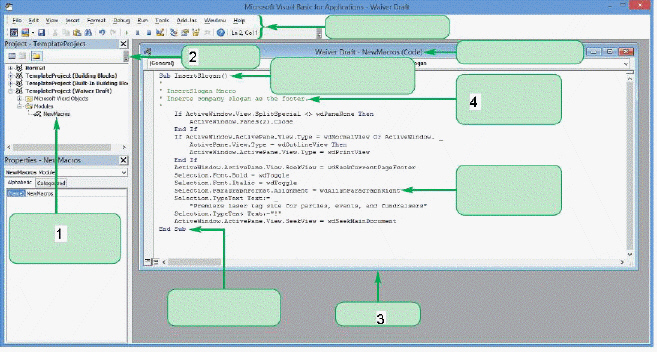 The item marked 1 in the accompanying figure is the NewMacros ____________________ containing the InsertSlogan macro.
 (Short Answer)
4.9/5 (84)
(84) The ____________________ field inserts the current date/time according to a date-time picture.
(Short Answer)
4.8/5 (82)
(82) Case-Based Critical Thinking Questions Case 8-2 A friend who is a power user of Word 2013 explains to you that there are many additional resources available in the Word Options dialog box-you just need to know where to find them. She is willing to help you uncover the hidden powers of this dialog box. Which of the following Word Options dialog box pages contains the user initials?
(Multiple Choice)
4.7/5 (84)
(84) Using macros to run frequently executed commands has three main advantages.
(True/False)
4.9/5 (83)
(83) 
Filters
- Essay(0)
- Multiple Choice(0)
- Short Answer(0)
- True False(0)
- Matching(0)