



 Chat with AI
Exam 1: Creating and Editing a Document

Exam 1: Creating and Editing a Document91 Questions
Exam 2: Navigating and Formatting a Document91 Questions
Exam 3: Creating Tables and a Multipage Report91 Questions
Exam 4: Enhancing Page Layout and Design91 Questions
Exam 5: Working With Templates, Themes, and Styles91 Questions
Exam 6: Using Mail Merge91 Questions
Exam 7: Collaborating With Others and Integrating Data91 Questions
Exam 8: Customizing Word and Automating Your Work91 Questions
Exam 9: Creating Online Forms Using Advanced Table Techniques91 Questions
Exam 10: Managing Long Documents91 Questions
Exam 11: Managing Your Files91 Questions
Select questions type


To verify that the pointer is located at the beginning of the document, press the ____________________ keys.
(Short Answer)
5.0/5  (88)
(88) The letters you type appear at the current location of the _______.
(Multiple Choice)
5.0/5 (89)
(89) 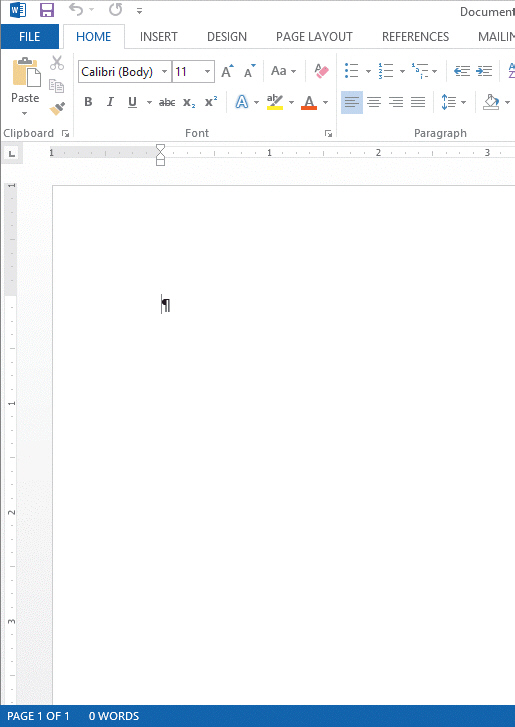 The _______ shown in the accompanying figure is only visible if nonprinting characters are turned on.
 (Multiple Choice)
4.9/5 (91)
(91) Case-Based Critical Thinking Questions Case 1-2 Kade is writing a cover letter that he will send with copies of his resume to different software development firms. Since a cover letter determines the first impression he will make, it has to be flawless. He has finished typing the letter but must stop to go to an evening class. He quickly saves it and exits Word 2013. Kade thinks that a photo may help to illustrate a point he is making in the letter about a project on which he has worked. What is the term for the photo he wants to insert into this document?
(Multiple Choice)
4.8/5 (75)
(75) As you type the body of a letter, Word automatically moves the insertion point to a new line when the current line is full.
(True/False)
4.9/5 (80)
(80) 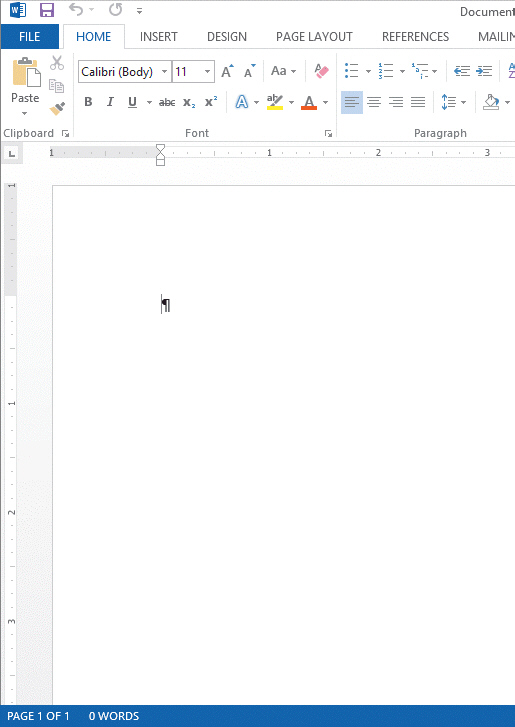 The _______ tab shown in the accompanying figure includes options for formatting and editing text.
 (Multiple Choice)
4.8/5 (82)
(82) By default, Word documents include .5-inch margins on all sides of the document.
(True/False)
4.8/5 (89)
(89) The ____________________ allow you to change the way the document is displayed.
(Short Answer)
4.9/5 (72)
(72) If you press the Shift+Enter keys at the end of a line, this inserts a _______ line break.
(Multiple Choice)
5.0/5 (90)
(90) ____________________ in the white space to the left of the document text to select an entire document.
(Short Answer)
4.8/5 (77)
(77) Case-Based Critical Thinking Questions Case 1-2 Kade is writing a cover letter that he will send with copies of his resume to different software development firms. Since a cover letter determines the first impression he will make, it has to be flawless. He has finished typing the letter but must stop to go to an evening class. He quickly saves it and exits Word 2013. In his work on the letter, Kade inserts a sentence, then changes his mind and deletes the sentence using the Cut command. He then changes his mind again and _______.
(Multiple Choice)
4.7/5 (77)
(77) Blue is the default font color and appears at the top of the Font Color gallery, with "Automatic" next to it.
(True/False)
4.9/5 (83)
(83) The PAGE LAYOUT tab displays options for adjusting the margins of your document.
(True/False)
4.9/5 (76)
(76) Portrait orientation is the default page orientation for Word documents.
(True/False)
5.0/5 (79)
(79) With ____________________ alignment the text is aligned along the right margin and is ragged along the left margin.
(Short Answer)
4.8/5 (88)
(88) _______ is a Word feature that automatically inserts the dates and other regularly used items.
(Multiple Choice)
4.9/5 (93)
(93) To correct an error marked by either the spelling or grammar checker, you can right-click the error, and then select the correct replacement on the _______ menu.
(Multiple Choice)
4.8/5 (73)
(73) 
Filters
- Essay(0)
- Multiple Choice(0)
- Short Answer(0)
- True False(0)
- Matching(0)