



 Chat with AI
Exam 6: Working With Themes and Building Blocks

Exam 1: Editing Documents59 Questions
Exam 2: Formatting Text and Paragraphs64 Questions
Exam 3: Formatting Documents60 Questions
Exam 4: Creating and Formatting Tables66 Questions
Exam 5: Illustrating Documents With Graphics66 Questions
Exam 6: Working With Themes and Building Blocks66 Questions
Exam 7: Merging Word Documents65 Questions
Exam 8: Getting Started With Microsoft66 Questions
Exam 9: Creating Documents With Word 201060 Questions
Exam 10: Working With Windows Live and Office Web Apps Question65 Questions
Select questions type


To be able to position text and graphics precisely on a document you plan to save as a Web page, it is best to ____.
(Multiple Choice)
4.7/5  (98)
(98) David wants to save the flyer as a Web page so he can advertise the store's sale on the Internet. How should he do this?
(Short Answer)
4.9/5 (80)
(80) A(n) ____________________ is a text box that contains a quote or excerpt from an article, formatted in a larger font size and placed on the same page.
(Short Answer)
4.7/5 (81)
(81) You use the ____ command on the Insert tab to insert sidebars and pull quotes.
(Multiple Choice)
4.9/5 (88)
(88) When you assign or update a document property by typing in a property control, the corresponding property field in the Document Properties Panel is updated.
(True/False)
4.8/5 (89)
(89) When you design a piece of content that you want to use again in other documents, you can save it as a(n) ____ in one of the Word galleries.
(Multiple Choice)
5.0/5 (73)
(73) ____ are the reusable pieces of formatted content or document parts that are stored in galleries, including headers and footers, cover pages, and text boxes.
(Multiple Choice)
4.8/5 (75)
(75) To change the color ____ or fonts used in the active Quick Style set, click the Change Styles button, point to Colors or Fonts, and then select from the options.
(Multiple Choice)
4.8/5 (69)
(69) A(n) ____________________ is a set of unified design elements, including colors, fonts for body text and headings, and effects for graphics.
(Short Answer)
4.8/5 (72)
(72) Click the ____ button in the Pages group on the Insert tab to insert a blank page at the location of the insertion point.
(Multiple Choice)
4.9/5 (84)
(84) To save an existing document in HTML format so it can be viewed with a browser, use the ____ command.
(Multiple Choice)
4.8/5 (77)
(77) Quick Objects include fields, document properties, and building blocks.
(True/False)
4.9/5 (84)
(84) How can you use Quick Style sets to give your document a polished and cohesive look?
(Essay)
4.9/5 (76)
(76) 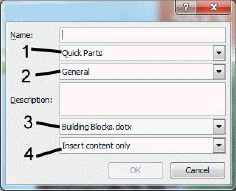 You can use item ____, shown in the accompanying figure, to specify a gallery for the building block.
 (Multiple Choice)
4.8/5 (81)
(81) What are building blocks and how do you save an item as a building block?
(Essay)
4.8/5 (76)
(76) 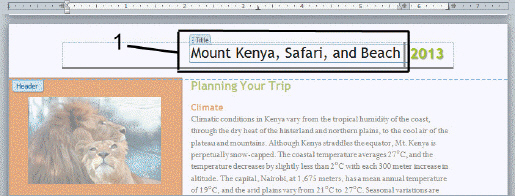 Item 1 in the accompanying figure refers to a Title ____________________ control.
 (Short Answer)
4.9/5 (65)
(65) Click the Theme Fonts button, then click ____ to select different fonts for headings and body text and then save the font combination as a new theme font set.
(Multiple Choice)
4.9/5 (78)
(78) To insert text from a file into your document, click the Insert tab, click the Object list arrow in the Text group, then click ____.
(Multiple Choice)
4.8/5 (91)
(91) 
Filters
- Essay(0)
- Multiple Choice(0)
- Short Answer(0)
- True False(0)
- Matching(0)