



 Chat with AI
Exam 8: Creating Documents With Word 2010

Exam 1: Understanding Essential Computer54 Questions
Exam 2: Getting Started With Access 2.0439 Questions
Exam 3: Integrating Word and Excel191 Questions
Exam 4: Getting Started With Microsoft328 Questions
Exam 5: Finishing a Presentation61 Questions
Exam 6: Appendix Working With Windows Live and Office Web Apps Question52 Questions
Exam 7: Getting Started With Windows 7130 Questions
Exam 8: Creating Documents With Word 2010243 Questions
Select questions type


What appears on the screen when you place the mouse pointer under text that was corrected by AutoCorrect?
(Multiple Choice)
4.8/5  (87)
(87) Sayako decides that she needs some help designing the layout and appearance of her letter. What could she use to quickly and easily create a pre-formatted document? Once she has written her letter, she needs to send it to many different people. Which Word feature could she use to easily personalize her letter for each individual client?
(Short Answer)
4.7/5 (74)
(74) Angela wants to give her press release an attractive and cohesive appearance. How can she quickly format her press release so it uses common fonts, colors, and styles?
(Short Answer)
4.9/5 (78)
(78) 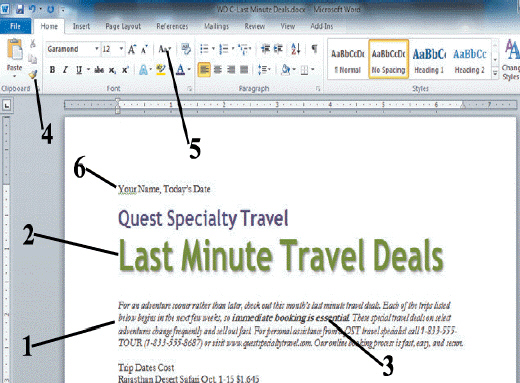 In the figure above, what does label 4 refer to?
Which feature allows you to copy multiple format settings at once?
(Multiple Choice)
4.7/5 (82)
(82) Describe how to replace all instances of a word in a document with a different word. How do you ensure that you only replace versions of the word that are in lowercase characters (ie. replace all instances of "president" but not "President")?
(Essay)
4.8/5 (73)
(73) Match each labeled element in the figure below with the statement that best describes it.
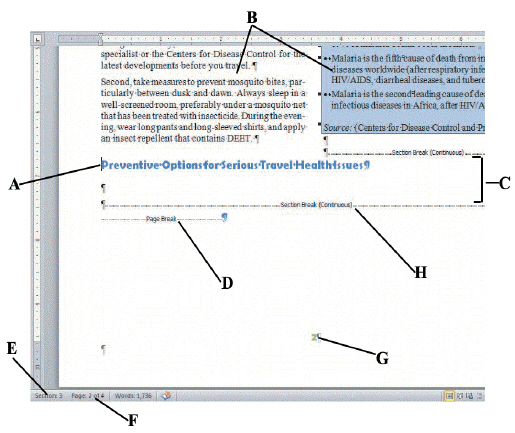
Correct Answer: Verified
Premises:
Responses:
(Matching)
4.8/5 (85)
(85) The Citations & Bibliography group is found on the ____________________ tab.
(Short Answer)
5.0/5 (95)
(95) You can cut and paste text using the buttons on the ____________________ group on the Home tab.
(Short Answer)
4.9/5 (93)
(93) What type of margins are used in a document with facing pages, such as a magazine?
(Multiple Choice)
4.9/5 (62)
(62) 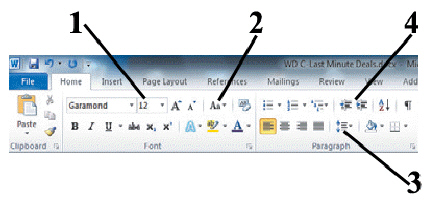 In the figure above, which button is used to change line spacing?
 (Multiple Choice)
4.9/5 (70)
(70) What is the alignment of text that is positioned so that both the left and right edges of the paragraph are flush with the left and right margins?
(Multiple Choice)
4.8/5 (78)
(78) Which setting ensures that at least two lines of a paragraph appear at the top and bottom of every page?
(Multiple Choice)
4.9/5 (91)
(91) Which Word view displays document text so it is easy to read and to annotate with comments and highlighting?
(Multiple Choice)
4.8/5 (73)
(73) You must apply text wrapping to a graphic in order to move it independently of text.
(True/False)
4.8/5 (74)
(74) User-defined details about a document that describe its contents and origin are known as:
(Multiple Choice)
5.0/5 (72)
(72) Which automatic feature in Word automatically corrects typos, minor spelling errors, and capitalization as you type?
(Multiple Choice)
4.8/5 (76)
(76) 
Filters
- Essay(0)
- Multiple Choice(0)
- Short Answer(0)
- True False(0)
- Matching(0)