



 Chat with AI
Exam 5: Getting Started With Microsoft

Exam 1: Getting Started With Access 2.068 Questions
Exam 2: Building and Using Queries68 Questions
Exam 3: Using Forms68 Questions
Exam 4: Using Reports Question68 Questions
Exam 5: Getting Started With Microsoft66 Questions
Exam 6: Web Apps: Working With Windows Live and Office Web Apps65 Questions
Select questions type


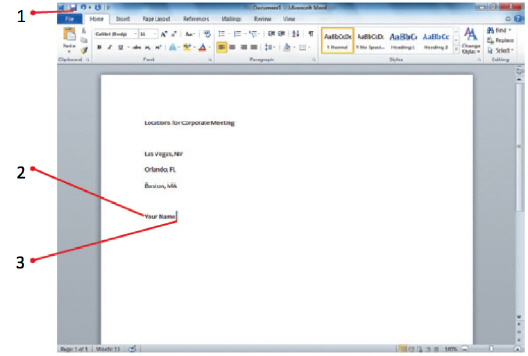 In the figure above, item 3 points to the ____.

Microsoft Office 2010 features an intuitive, command-line user interface, so you can get up to speed faster and use advanced features with greater ease.
(True/False)
4.9/5  (70)
(70) ____ are predesigned combinations of color and formatting attributes you can apply, and are available in most Office programs.
(Multiple Choice)
4.9/5 (73)
(73) You want to document your family's personal expenses and decide to use Excel 2010.The Excel spreadsheet in progress appears below.
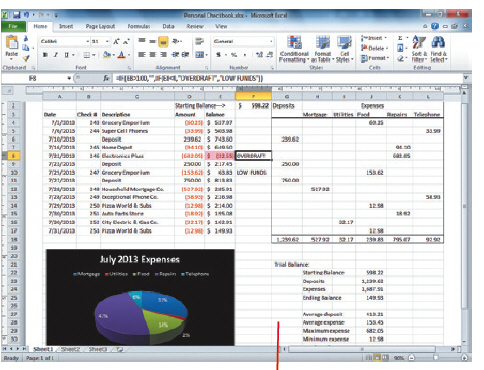 How would you save the expense workbook with a new name in Excel?
 (Short Answer)
4.8/5 (86)
(86) By saving an existing Office file with the ____ command, you create a duplicate that you can modify, while the original file remains intact.
(Multiple Choice)
4.9/5 (68)
(68) To view the preview pane, click the ____ tab, and click Print on the navigation bar.
(Multiple Choice)
4.9/5 (80)
(80) In Word, you must create and save a file before you enter any data.
(True/False)
4.9/5 (79)
(79) You want to document your family's personal expenses and decide to use Excel 2010.The Excel spreadsheet in progress appears below.
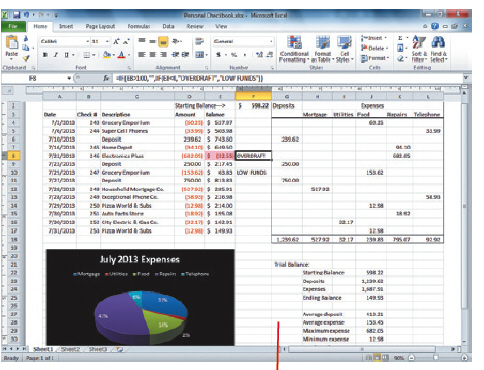 What type of document does the Excel program represent?
 (Short Answer)
4.8/5 (80)
(80) A file created in ____ is called a document and has a .docx extension.
(Multiple Choice)
4.9/5 (77)
(77) 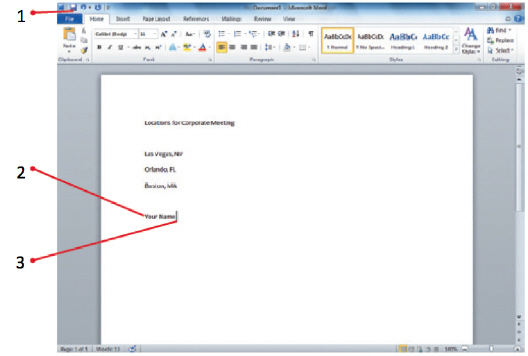 Once you have saved the document shown in the figure above for the first time, clicking the ____ button saves changes without opening up a dialog box.
 (Multiple Choice)
4.7/5 (87)
(87) In Excel, you enter data in ____, which are formed by the intersection of a row and a column.
(Multiple Choice)
5.0/5 (64)
(64) Using Microsoft Office ____________________ 2010, it's easy to create powerful presentations complete with graphics, transitions, and even a soundtrack.
(Short Answer)
4.8/5 (78)
(78) 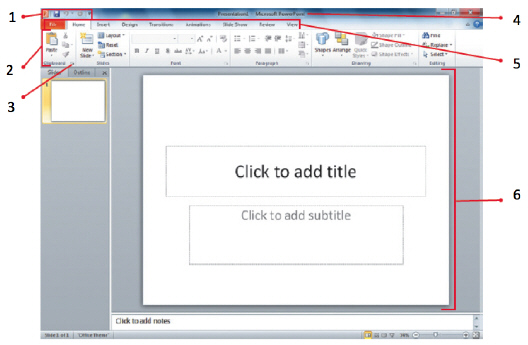 In the figure above, line 6 is pointing to a ____.
Zooming in, or choosing a higher zoom ____, makes a document appear bigger on screen, but less of it fits on the screen at once.
(Multiple Choice)
4.7/5 (80)
(80) Clicking Open as Copy creates a copy of an Office file already saved and named with the word "____" in the title.
(Multiple Choice)
4.9/5 (75)
(75) When you open a file created in an earlier version of Office, "____ Mode" appears in the title bar, letting you know the file was created in an earlier, but usable version of the program.
(Multiple Choice)
4.8/5 (88)
(88) 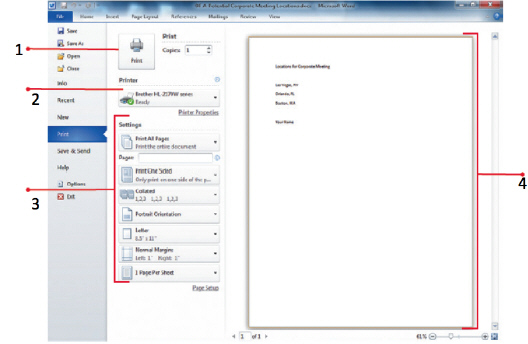 If you want to print the document using a different printer, which button would you select?
 (Multiple Choice)
4.9/5 (88)
(88) 
Filters
- Essay(0)
- Multiple Choice(0)
- Short Answer(0)
- True False(0)
- Matching(0)