



 Chat with AI
Exam 13: Making Presentations

Exam 1: Getting Started75 Questions
Exam 2: Looking at Windows75 Questions
Exam 3: Installing and Using Software75 Questions
Exam 4: File Basics75 Questions
Exam 5: Organizing Files and Folders75 Questions
Exam 6: Protecting Files75 Questions
Exam 7: Connecting to the Internet74 Questions
Exam 8: Browsing and Searching the Web74 Questions
Exam 9: Sending E-Mail and Attachments75 Questions
Exam 10: Writing and Printing Documents75 Questions
Exam 11: Working With Spreadsheets75 Questions
Exam 12: Accessing Databases75 Questions
Exam 13: Making Presentations75 Questions
Exam 14: Recording and Editing Sound75 Questions
Exam 15: Working With Graphics75 Questions
Exam 16: Creating Desktop Video and Animation75 Questions
Exam 17: Looking Under the Hood75 Questions
Exam 18: Computing Programming75 Questions
Select questions type


Describe how transitions and animations in presentation design are used effectively.
(Essay)
4.9/5  (82)
(82) To remember what you want to say, you can add ____________________ to each slide.
(Short Answer)
4.7/5 (69)
(69) A program called ____ displays presentations on computers on which PowerPoint is not installed.
(Multiple Choice)
4.8/5 (75)
(75) Prices for computer projection devices are US$199 and up, with ____________________ projectors costing a bit more than LCD projectors with similar features.
(Short Answer)
4.8/5 (94)
(94) Case-Based Critical Thinking Questions Case 13-1 Lynn has to give a presentation in her public speaking class. The school has provided her with Microsoft PowerPoint, a popular presentation software. Lynn wants to make sure that her presentation is also fun to watch. She wants to use transition and animation effects to keep her audience interested. When using effects, Lynn should ____.
(Multiple Choice)
4.9/5 (78)
(78) Speaker notes not only remind you of what you want to say about a slide, but also help to maintain good ____ with your audience.
(Multiple Choice)
4.8/5 (84)
(84) 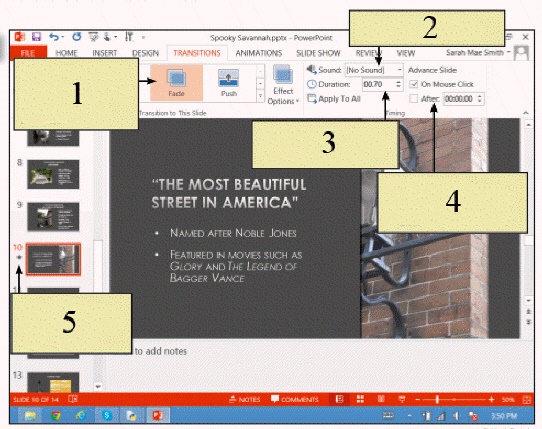 In the figure above, item 4 refers to the place where you can specify ____.
 (Multiple Choice)
4.9/5 (75)
(75) Presentation software offers a variety of ____ that help you place titles, text, lists, graphs, and other elements.
(Multiple Choice)
4.8/5 (81)
(81) You can create a presentation by using the ____ feature of your presentation software to work on the progression of ideas you want to present.
(Multiple Choice)
4.8/5 (66)
(66) A frequently-used animation effect makes ____________________ list items glide onto a slide one by one under the control of the person delivering the presentation.
(Short Answer)
4.9/5 (80)
(80) When using a(n) ____________________, the mirrors rotate to create different colored dots on the projected image.
(Short Answer)
4.8/5 (76)
(76) Keystone control compensates for the position of the projector to produce a professional-looking rectangular image.
(True/False)
4.8/5 (72)
(72) Word processing software can help create the visual backdrop for speeches, lectures, and demonstrations.
(True/False)
4.9/5 (83)
(83) ____________________ can support the message you want your presentation to communicate.
(Short Answer)
4.8/5 (63)
(63) When using PowerPoint, select a pen or highlighter from the ____________________ menu by right-clicking the slide.
(Short Answer)
4.9/5 (91)
(91) To embellish your presentation with additional facts and comments, you can use ____.
(Multiple Choice)
4.8/5 (95)
(95) LCD projectors shine a bright light onto an array of miniature mirrors.
(True/False)
4.8/5 (68)
(68) Using the pen or hightlighter, hold down the right mouse button and drag the pointer to write on the slide.
(True/False)
4.7/5 (78)
(78) 
Filters
- Essay(0)
- Multiple Choice(0)
- Short Answer(0)
- True False(0)
- Matching(0)