



 Chat with AI
Exam 6: Protecting Files

Exam 1: Getting Started75 Questions
Exam 2: Looking at Windows75 Questions
Exam 3: Installing and Using Software75 Questions
Exam 4: File Basics75 Questions
Exam 5: Organizing Files and Folders75 Questions
Exam 6: Protecting Files75 Questions
Exam 7: Connecting to the Internet74 Questions
Exam 8: Browsing and Searching the Web74 Questions
Exam 9: Sending E-Mail and Attachments75 Questions
Exam 10: Writing and Printing Documents75 Questions
Exam 11: Working With Spreadsheets75 Questions
Exam 12: Accessing Databases75 Questions
Exam 13: Making Presentations75 Questions
Exam 14: Recording and Editing Sound75 Questions
Exam 15: Working With Graphics75 Questions
Exam 16: Creating Desktop Video and Animation75 Questions
Exam 17: Looking Under the Hood75 Questions
Exam 18: Computing Programming75 Questions
Select questions type


A system recovery drive boots your computer from an external hard drive or USB flash drive, and helps you reinstall Windows along with the device drivers and utilities needed to get your computer up and running.
(True/False)
4.9/5  (67)
(67) ____ utilities are designed to back up and restore files from a computer's primary storage device.
(Multiple Choice)
4.8/5 (67)
(67) Which of the following can damage files to the point where the data they contain is no longer accessible?
(Multiple Choice)
4.8/5 (85)
(85) A virus program is a series of unique bytes that uniquely identifies a virus and distinguishes it from legitimate files on your PC.
(True/False)
4.9/5 (82)
(82) Computer files can become corrupted when they are not opened properly.
(True/False)
4.8/5 (75)
(75) The option that automatically makes copies of files as you are working on them is ____.
(Multiple Choice)
4.9/5 (76)
(76) Any software that can automate a task or autonomously execute a task when commanded to do so is called a(n) ____.
(Multiple Choice)
4.7/5 (69)
(69) ____________________ is created and unleashed by individuals referred to as hackers, crackers, black hats, or cybercriminals.
(Short Answer)
4.9/5 (83)
(83) Which of the following is an example of malicious software that can alter data on your computer?
(Multiple Choice)
4.9/5 (80)
(80) A(n) ____________________ makes backup copies of files as they are added or changed.
(Short Answer)
4.7/5 (78)
(78) Case-Based Critical Thinking Questions Case 6-1 Jill is concerned about the security of her computer. She is worried that her files may be in danger while being stored on her computer. Jill has antivirus software installed on her computer. She must make sure to ____.
(Multiple Choice)
4.9/5 (80)
(80) The autosave option automatically makes copies of files as you are working on them.
(True/False)
4.9/5 (92)
(92) 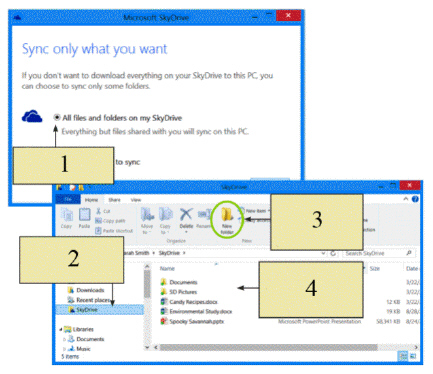 In the figure above, which item sets up SkyDrive and makes sure it is synced with your computer?
 (Multiple Choice)
4.8/5 (74)
(74) Another strategy for protecting important files is to ____ copy them to a USB flash drive, external hard disk, CD, or DVD.
(Multiple Choice)
4.9/5 (72)
(72) If an application hangs up, you can use the ____ to close a non-responding program.
(Multiple Choice)
4.9/5 (83)
(83) You can often set the autosave option to specify where and how frequently data is stored.
(True/False)
4.7/5 (89)
(89) A series of unique bytes that identifies a virus and distinguishes it from legitimate files on your PC is called a ____.
(Multiple Choice)
4.7/5 (90)
(90) An exact copy of all the files stored on a drive is a(n) ____.
(Multiple Choice)
4.7/5 (96)
(96) Case-Based Critical Thinking Questions Case 6-1 Jill is concerned about the security of her computer. She is worried that her files may be in danger while being stored on her computer. Jill knows that a data file is most vulnerable while you are working with it. She activated her AutoRecovery option, but she should still ____.
(Multiple Choice)
4.8/5 (81)
(81) 
Filters
- Essay(0)
- Multiple Choice(0)
- Short Answer(0)
- True False(0)
- Matching(0)