



 Chat with AI
Exam 4: File Basics

Exam 1: Getting Started75 Questions
Exam 2: Looking at Windows75 Questions
Exam 3: Installing and Using Software75 Questions
Exam 4: File Basics75 Questions
Exam 5: Organizing Files and Folders75 Questions
Exam 6: Protecting Files75 Questions
Exam 7: Connecting to the Internet74 Questions
Exam 8: Browsing and Searching the Web74 Questions
Exam 9: Sending E-Mail and Attachments75 Questions
Exam 10: Writing and Printing Documents75 Questions
Exam 11: Working With Spreadsheets75 Questions
Exam 12: Accessing Databases75 Questions
Exam 13: Making Presentations75 Questions
Exam 14: Recording and Editing Sound75 Questions
Exam 15: Working With Graphics75 Questions
Exam 16: Creating Desktop Video and Animation75 Questions
Exam 17: Looking Under the Hood75 Questions
Exam 18: Computing Programming75 Questions
Select questions type


A file is a collection of data that has a name and is stored on a hard drive or other storage device.
(True/False)
5.0/5  (68)
(68) Each document, graph, or picture you create with application software is stored as a(n) ____.
(Multiple Choice)
4.8/5 (69)
(69) A ____ is a set of characters added to a file name to indicate the file's contents and origin.
(Multiple Choice)
4.7/5 (79)
(79) Each ____ of a hard disk is a fixed size and can hold a certain amount of data.
(Multiple Choice)
4.8/5 (75)
(75) 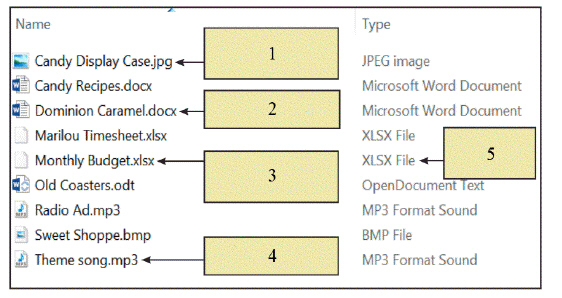 In the accompanying figure, item 2 is pointing to the ____.
 (Multiple Choice)
4.8/5 (81)
(81) The ____ option allows you to select a name and storage device for a file.
(Multiple Choice)
4.8/5 (74)
(74) Windows provides a fragmentation utility that you can use periodically to put the data for each file in adjacent sectors.
(True/False)
4.8/5 (79)
(79) 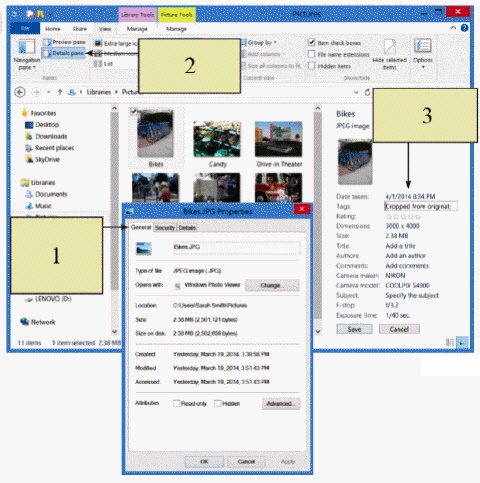 In the accompanying figure, item 2 is pointing to the ____.
 (Multiple Choice)
4.7/5 (96)
(96) A typical PC hard disk drive usually contains two to four platters.
(True/False)
4.9/5 (74)
(74) A hard disk is divided into concentric circles called ____.
(Multiple Choice)
4.8/5 (83)
(83) Today's hard disk drives have access times of about ____ milliseconds.
(Multiple Choice)
4.8/5 (85)
(85) If you run out of disk space on your original hard disk, you can add a second hard drive inside the system unit or use a(n) ____.
(Multiple Choice)
4.9/5 (85)
(85) Files can be divided into two categories: executable files and ____.
(Multiple Choice)
4.9/5 (83)
(83) Clicking a file from the ____________________ list starts the application and opens the file.
(Short Answer)
4.8/5 (75)
(75) On the Windows ____, you can double-click a file icon to open a file.
(Multiple Choice)
4.7/5 (79)
(79) Windows provides a(n) ____ utility that can be used to periodically put the data for each file in adjacent sectors.
(Multiple Choice)
4.8/5 (85)
(85) 
Filters
- Essay(0)
- Multiple Choice(0)
- Short Answer(0)
- True False(0)
- Matching(0)