



 Chat with AI
Exam 8: Using Document Collaboration, Integration, and Charting Tools

Exam 1: Creating, Formatting, and Editing a Word Document With a Picture111 Questions
Exam 2: Creating a Research Paper With References and Sources110 Questions
Exam 3: Creating a Business Letter With a Letterhead and Table112 Questions
Exam 4: Creating a Document With a Title Page, Lists, Tables, and a Watermark111 Questions
Exam 5: Using a Template to Create a Resume and Sharing a Finished Document106 Questions
Exam 6: Generating Form Letters, Mailing Labels, and a Directory109 Questions
Exam 7: Creating a Newsletter With a Pull-Quote and Graphics111 Questions
Exam 8: Using Document Collaboration, Integration, and Charting Tools109 Questions
Exam 9: Creating a Reference Document With a Table of Contents and an Index106 Questions
Exam 10: Creating a Template for an Online Form110 Questions
Exam 11: Enhancing an Online Form and Using Macros108 Questions
Exam 12: Office 2013 and Windows 8 Essential Concepts and Skills112 Questions
Select questions type


To see how a document looked before any changes were made,click the 'Display for Review' button arrow and then click ____ on the Display for Review menu.
(Multiple Choice)
4.8/5  (63)
(63) You can compare two documents to each other,which allows you easily to identify any differences between the two files.
(True/False)
4.9/5 (92)
(92) When a document is a(n)____________________ file,no further edits can be made to it.
(Essay)
4.9/5 (73)
(73) Identify the letter of the choice that best matches the phrase or definition.
a.posts
f.cell
b.collaborate
g.document inspector
c.memo
h.object
d.linked
i.Reviewing task pane
e.comment
j.markups
-Another word for revision marks.
(Essay)
4.8/5 (72)
(72) By default,Word selects the first ____ columns in a chart spreadsheet window.
(Multiple Choice)
4.9/5 (82)
(82) You edit a pasted document using editing features of the source program.
(True/False)
4.8/5 (76)
(76) You can find a comment from a specific reviewer through the ____ dialog box.
(Multiple Choice)
4.9/5 (70)
(70) A(n)____________________ is,for example,an Excel worksheet from an Excel workbook that is copied from a source (Excel)to a destination (a document in Word).
(Essay)
4.9/5 (85)
(85) To reply to an existing comment,you select the comment and then follow the same steps that you would to insert a comment.
(True/False)
4.7/5 (63)
(63) 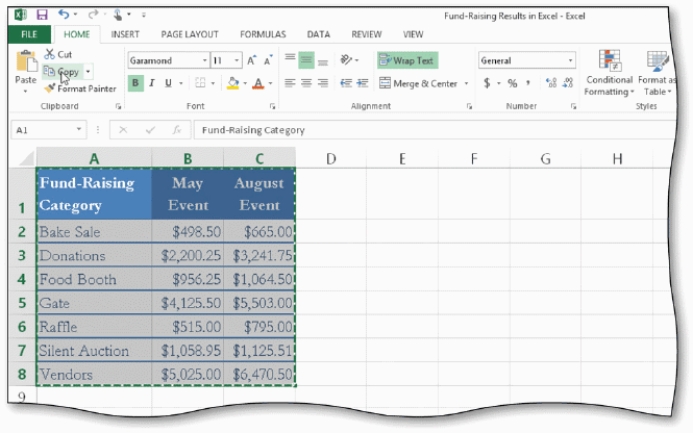 -Tap or click the '____________________' button on the VIEW tab to display each open window side-by-side.
 (Essay)
4.8/5 (97)
(97) To display the Go To sheet in the Find and Replace dialog box,press ____.
(Multiple Choice)
4.9/5 (75)
(75) Microsoft ____ is a legacy charting program included with previous versions of Word.
(Multiple Choice)
4.9/5 (89)
(89) Which of the following is an example of an interaction that Word can have with other programs?
(Multiple Choice)
4.9/5 (79)
(79) You should be confident that a source file does not contain a(n)____ or other potentially harmful program before you instruct Word to link the source file to the destination document.
(Multiple Choice)
4.8/5 (76)
(76) When you embed an object,like a pasted object it does not become part of the destination document.
(True/False)
4.9/5 (74)
(74)
-When you open a document that contains a linked object,Word attempts to locate the ____________________ file associated with the link.
-When you open a document that contains a linked object,Word attempts to locate the ____________________ file associated with the link. (Essay)
4.7/5 (80)
(80) Word provides the capability for users to work with other users,or ____________________,on a document.
(Essay)
5.0/5 (89)
(89) The vertical bar in the margin indicates a tracked change is on that line to the right of the bar.
(True/False)
5.0/5 (75)
(75) 
Filters
- Essay(0)
- Multiple Choice(0)
- Short Answer(0)
- True False(0)
- Matching(0)