Multiple Choice
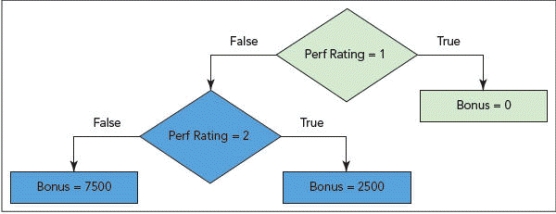
-The complete formula that corresponds to the flowchart in the accompanying figure is _____.
A) =IF([Perf Rating]=2,2500,IF([Perf Rating]=1,2500,7500) )
B) =AND([Perf Rating]=2,2500,AND([Perf Rating]=1,2500,7500) )
C) =IF([Perf Rating]=1,0,IF([Perf Rating]=2,2500,7500) )
D) =AND([Perf Rating]=1,2500,AND([Perf Rating]=2,0,7500) )
Correct Answer:

Verified
Correct Answer:
Verified
Q25: When you want to reference an entire
Q55: MATCHING<br>Identify the letter of the choice that
Q57: The _ function is a logical function
Q57: The major difference between HLOOKUP and VLOOKUP
Q63: When using VLOOKUP,the _argument is optional.<br>A)lookup_value<br>B)table_array<br>C)range_lookup<br>D)col_index
Q65: The _ function is a logical function
Q65: An error value begins with a(n)_ followed
Q67: When you create a formula that references
Q70: The COUNTIF function is sometimes referred to
Q121: To retrieve a particular value from a