Multiple Choice
Examine the flow below: 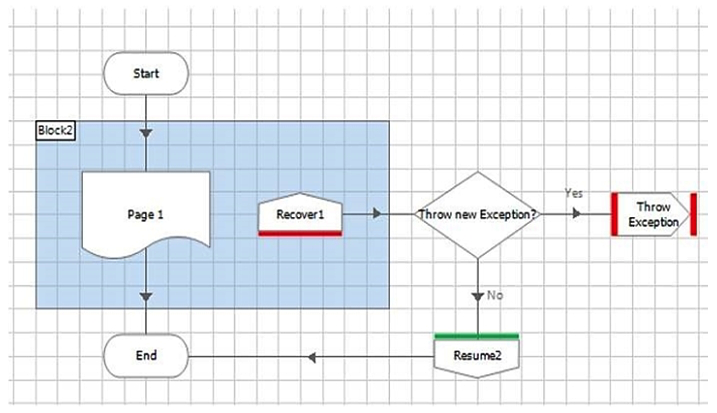 An error has been encountered on Page1 and the exception has bubbled up to be recovered in the Recover1 stage. The 'Yes' path has been taken from the "Throw new Exception?" decision stage. Consider the Throw Exception stage properties below:
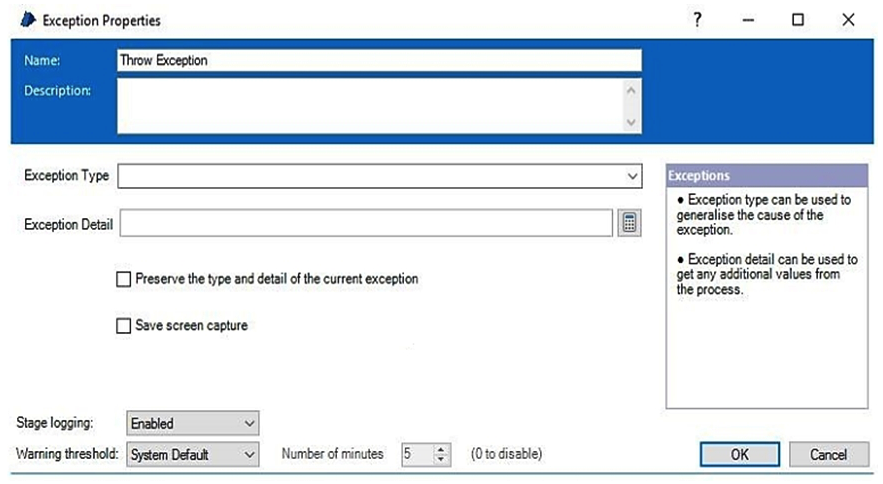 How should the properties be configured for the Process to throw a new Business exception, i.e. a different exception to the one encountered in Page1?
A) Configure Exception Type() in the Exception Type field and ExceptionDetail() in the Exception Detail field. Leave the Preserve the type and detail of the current exception checkbox un-ticked.
B) Tick the Preserve the type and detail of the current exception checkbox. Leave the Exception Type and Exception Detail fields blank.
C) Leave the Exception Type field blank and type "Business Exception" in the Exception Detail field.
D) Type Business Exception in the Exception Type field and type a custom message in the Exception Detail field.
Correct Answer:

Verified
Correct Answer:
Verified
Q11: The Saved Quantity Data Item is configured
Q12: Examine the following process flow: <img src="https://d2lvgg3v3hfg70.cloudfront.net/C1161/.jpg"
Q13: Study the process flow below: <img src="https://d2lvgg3v3hfg70.cloudfront.net/C1161/.jpg"
Q14: A Blue Prism solution works fine when
Q15: Consider the following flow within an Object
Q17: What is the syntax for using a
Q18: The Work Queue "Customer Onboarding" has a
Q19: Examine the following process flow: <img src="https://d2lvgg3v3hfg70.cloudfront.net/C1161/.jpg"
Q20: Which of the following can you perform
Q21: A screen contains four buttons, Find, Save,